If you are looking to dive into PC gaming without draining your bank account, a cheap gaming desktop is one of the smartest investments you can make today. The misconception that affordable means underpowered is absolutely outdated in 2024 and beyond. With the right combination of components, you can build or buy a budget-friendly gaming machine that handles modern titles at respectable frame rates, supports ray tracing in select games, and delivers a genuinely immersive experience. Whether you are a student on a tight budget, a casual gamer exploring the hobby, or someone who wants a dedicated gaming rig without the premium price tag, this guide covers everything you need to know about assembling or choosing a budget gaming desktop that punches well above its price class.

What Exactly Is a Cheap Gaming Desktop?
Defining the Budget Gaming Segment
A cheap gaming desktop typically refers to a machine that costs between $500 and $900, delivering solid 1080p gaming performance across most titles. These systems prioritize value over luxury, focusing on the essential hardware that drives frame rates and graphical fidelity. Unlike premium builds that chase 4K resolution with RTX 4080 or 4090 GPUs, budget gaming desktops target the sweet spot where price and performance intersect. The goal is not to play every game at maximum settings but to provide a smooth, enjoyable experience that lets you compete, explore, and have fun without constant stuttering or lag.
Key characteristics of a budget gaming desktop include:
- A mid-range CPU from AMD or Intel’s latest affordable lineup
- A dedicated GPU from NVIDIA’s GTX 1650 to RTX 4060 tier or AMD’s RX 6600 to RX 7600 range
- At least 16GB of DDR4 or DDR5 RAM
- A 500GB NVMe SSD for fast boot and load times
- A reliable power supply and adequate cooling solution
Key Components That Matter Most
Understanding what makes a budget gaming desktop tick requires a basic knowledge of each major component and how it contributes to overall gaming performance. Let us break down the most critical parts.
Processor (CPU)
The CPU handles game logic, physics calculations, and AI processing. For a cheap gaming desktop, the AMD Ryzen 5 5600 or Intel Core i5-12400F are outstanding choices. Both chips offer six cores and twelve threads, which is more than enough for modern gaming workloads. They also leave room in the budget for a stronger graphics card, which has a far greater impact on frame rates in most titles. When selecting a processor for a budget build, always prioritize single-thread performance, as most games still rely heavily on one or two cores for the main rendering pipeline.
Graphics Card (GPU)
The GPU is the single most important component in any gaming desktop, and this holds true even on a tight budget. NVIDIA’s GTX 1650 and RTX 3050, along with AMD’s RX 6600, represent the most popular tiers in the budget segment. The RX 6600, for example, delivers excellent 1080p performance and can handle ray tracing in supported titles better than many competing options at its price point. If your budget allows stretching to $900, the RTX 4060 offers DLSS 3 support, significantly boosting frame rates in compatible games without requiring a more expensive GPU. Always match your GPU choice to your target monitor resolution — 1080p is the natural home for budget gaming builds.
RAM and Storage
Modern games demand at least 16GB of system memory. 8GB is simply not enough anymore, and trying to game on 8GB will result in stuttering, crashes, and poor performance in titles like Cyberpunk 2077 or Hogwarts Legacy. DDR4 RAM remains the most cost-effective option for budget builds, though DDR5 prices are dropping rapidly. For storage, a 500GB NVMe SSD provides lightning-fast load times and is the minimum recommended capacity. Adding a secondary 1TB or 2TB hard drive for game storage is an easy and affordable upgrade that keeps your library growing without breaking the bank.
Best Cheap Gaming Desktop Builds for 2024 and Beyond
Building your own budget gaming desktop offers the best value per dollar, since you avoid brand premiums and pre-built markups. Here are three tiers of budget builds that deliver excellent gaming performance.
- Ultra-Budget Build ($500–$650): AMD Ryzen 5 5500, AMD Radeon RX 6500 XT, 16GB DDR4 RAM, 500GB NVMe SSD. This build handles esports titles like Valorant, League of Legends, and Fortnite at high frame rates and can run mainstream games on medium settings.
- Mid-Range Budget Build ($650–$800): Intel Core i5-12400F, NVIDIA RTX 3050, 16GB DDR4 RAM, 1TB NVMe SSD. This configuration delivers smooth 1080p gaming at high or ultra settings in most titles, including AAA releases.
- Sweet-Spot Budget Build ($800–$950): AMD Ryzen 5 5600, NVIDIA RTX 4060, 16GB DDR4 RAM, 1TB NVMe SSD. This is arguably the best value build available right now, offering ray tracing support, DLSS 3 frame generation, and consistent 60+ FPS in virtually every modern title at 1080p.
Pre-Built vs. DIY: Which Is Cheaper?
One of the most common questions among first-time buyers is whether to purchase a pre-built cheap gaming desktop or assemble one from individual components. The answer depends on your comfort level with hardware and your willingness to invest time in research. Pre-built systems from manufacturers like HP, Dell, and Lenovo often run sales that bring prices down significantly, and they come with warranties and technical support that DIY builds lack. However, pre-built budget desktops frequently cut corners on power supply quality, case airflow, and storage speed to hit a lower price point.
DIY builds give you full control over every component, ensuring that you get the best performance for every dollar spent. You can also plan for future upgrades by choosing a motherboard with spare RAM slots and M.2 expansion headers. The trade-off is the time investment and the need to troubleshoot any issues that arise. For most people serious about getting the best value, a DIY budget build delivers superior performance per dollar compared to any pre-built option in the same price range.
Comparison Table: Budget Gaming Desktop Options
| Build Tier | Price Range | CPU | GPU | 1080p Performance |
| Ultra-Budget | $500–$650 | Ryzen 5 5500 | RX 6500 XT | Medium-High, 60 FPS esports |
| Mid-Range Budget | $650–$800 | i5-12400F | RTX 3050 | High, 60+ FPS AAA |
| Sweet-Spot Budget | $800–$950 | Ryzen 5 5600 | RTX 4060 | Ultra, 60+ FPS AAA + Ray Tracing |
Expert Tips to Stretch Your Dollar Further
Getting the most out of a budget gaming desktop goes beyond selecting the right components. Here are proven strategies that experienced builders and budget-conscious gamers use to maximize performance without increasing spending.
- Buy refurbished or open-box components: GPUs, CPUs, and RAM sold as refurbished or open-box can save you 20–40% compared to brand-new prices, with little to no difference in performance or reliability.
- Prioritize the GPU over the CPU: In gaming, the graphics card matters more than the processor for frame rates. Spend more on the GPU and save on the CPU within reason.
- Use FSR or DLSS upscaling: Both AMD FSR and NVIDIA DLSS use AI or spatial upscaling to render games at lower resolutions and upscale them, dramatically improving frame rates with minimal visual loss.
- Shop during major sales events: Black Friday, Amazon Prime Day, and end-of-fiscal-year sales from manufacturers like ASUS and MSI often feature deep discounts on budget gaming desktops and individual components.
- Consider last-generation parts: Components from the previous generation, such as the Ryzen 5000 series or RTX 30-series GPUs, still deliver excellent gaming performance at significantly lower prices than their newest counterparts.
Frequently Asked Questions (FAQ)
What is the cheapest gaming desktop I can build that still plays modern games?
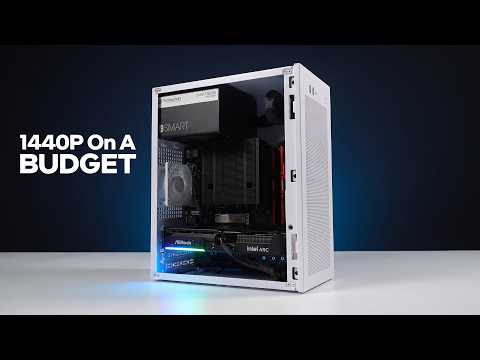
The cheapest viable modern gaming desktop starts around $500 with an AMD Ryzen 5 5500 or Intel i3-12100F paired with a GTX 1650 or RX 6500 XT GPU. While this build will not max out every AAA title, it will comfortably run esports games and lighter AAA titles at 1080p with acceptable frame rates. Adding a 16GB RAM kit and a 500GB NVMe SSD completes the build without pushing past the $500 mark.
Is it better to buy a pre-built cheap gaming desktop or build one myself?
Building your own desktop almost always provides better performance per dollar, since you control component selection and avoid brand premiums. However, if you prefer convenience and do not want to deal with assembly or troubleshooting, pre-built options from trusted brands like HP Omen, Dell G-Series, or Lenovo Legion offer solid entry-level gaming experiences with included warranties and support.
Can a cheap gaming desktop handle ray tracing?
Budget desktops equipped with NVIDIA RTX 3050 or RTX 4060 GPUs can handle ray tracing, but typically at reduced settings and with upscaling technologies like DLSS enabled to maintain playable frame rates. AMD RX 6600 and RX 7600 GPUs also support ray tracing, though NVIDIA’s implementation tends to be more mature and better optimized in most titles currently on the market.
How much RAM do I need for budget gaming in 2024?
16GB of RAM is the current minimum standard for modern gaming desktops. Some newer titles and multitasking scenarios benefit from 32GB, but 16GB remains the sweet spot for budget builds, offering excellent performance in virtually every game without unnecessarily inflating the total cost of the system.
What monitor should I pair with a budget gaming desktop?
A 1080p 144Hz monitor is the ideal pairing for a cheap gaming desktop. The high refresh rate ensures smooth visuals during fast-paced gameplay, and 1080p resolution keeps the GPU workload manageable, allowing you to achieve high frame rates even with mid-range budget graphics cards. Look for IPS panels for better color accuracy and viewing angles.
Will a cheap gaming desktop become outdated quickly?
Budget builds do have a shorter lifespan at the highest settings compared to premium systems, but their modular design means you can upgrade individual components as needed. Starting with a Ryzen 5 5600 or i5-12400F platform gives you a solid foundation that can be upgraded with a better GPU or more RAM in the future without replacing the entire system.
Conclusion
A cheap gaming desktop is far more than a compromise — it is a strategic approach to PC gaming that prioritizes value, performance, and long-term upgradeability. Whether you choose to build from individual components or purchase a pre-built system, the budget gaming market in 2024 offers remarkable options that deliver genuine 1080p gaming excellence at prices that make sense. By focusing on the right balance of CPU, GPU, RAM, and storage, and by taking advantage of sales and smart purchasing strategies, you can own a capable gaming machine without overspending. The key is to invest wisely, plan for incremental upgrades, and resist the temptation to overspend on features you do not actually need. With the guidance in this article, you are now equipped to make informed decisions and find the best cheap gaming desktop for your budget and gaming goals.