


Finding the best gaming headset for PC in 2024 can feel overwhelming when you are scrolling through hundreds of options with conflicting reviews, price tags, and marketing buzzwords. Whether you are a casual player unwinding after work or a competitive esports enthusiast chasing that clutch victory, your headset is arguably the most important peripheral in your setup. A great pair of PC gaming headphones does more than just pump out sound—it delivers spatial awareness, crystal-clear team communication, and hours of comfortable wear without fatigue. In this deep dive, we break down the top picks, explain what separates a good gaming headset from a great one, and give you actionable advice so you can buy with confidence.
What Makes a Gaming Headset the Best for PC?

Not every headset marketed as a “gaming headset” deserves that label. The best gaming headset for PC needs to excel across several technical and ergonomic dimensions that go beyond flashy RGB lighting. Understanding these factors helps you separate marketing hype from genuine audio performance.
Driver Size and Frequency Response
The driver is the heart of any headset. Larger drivers, typically 50mm or above, tend to produce richer bass and more expansive soundscapes. However, driver size alone does not guarantee quality. The frequency response range matters too—a headset covering 20Hz to 20kHz with a flat, balanced tuning profile will reproduce footsteps, gunfire, and ambient game audio with impressive accuracy. For competitive shooters, this means hearing enemy footsteps through walls and pinpointing their exact location, which directly impacts your performance in games like Valorant, Counter-Strike 2, and Apex Legends.
Microphone Clarity and Noise Suppression
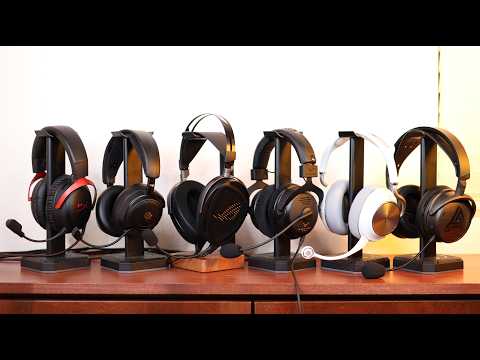
Your microphone is just as critical as the audio drivers, especially if you regularly communicate with teammates. The best PC gaming headsets feature retractable or detachable boom microphones with noise-canceling technology that filters out background chatter, keyboard clatter, and fan noise. Some premium models use AI-powered noise suppression algorithms that adapt in real time, ensuring your voice comes through crisp and clean on Discord or in-game voice chat.
Comfort and Build Quality
If you game for extended sessions—three, four, or more hours at a stretch—comfort becomes non-negotiable. Look for headsets with memory foam ear cushions, lightweight frames, and adjustable headbands that distribute pressure evenly. Over-ear designs generally outperform on-ear alternatives for marathon sessions because they do not press against your ears. Build quality also matters: a sturdy steel or aluminum frame paired with a detachable cable will outlast flimsy plastic alternatives by years.
Top Gaming Headsets for PC in 2024
SteelSeries Arctis Nova 7
The SteelSeries Arctis Nova 7 remains one of the most versatile wireless gaming headsets for PC. It uses a 2.4GHz wireless connection that delivers lossless audio with virtually zero latency, and it also supports Bluetooth for switching seamlessly between your gaming PC and your phone. The dual-battery system means you get 30-plus hours of continuous play, and the ski-goggle-style headband distributes weight beautifully across your skull. The ClearCast microphone flips up to mute, and it offers excellent background noise rejection.
HyperX Cloud III
For those who prefer a wired connection, the HyperX Cloud III is a phenomenal choice at a very accessible price point. It features 53mm drivers that deliver punchy bass and clear mids, making it ideal for both competitive shooters and story-driven RPGs. The memory foam ear pads and padded headband ensure comfort even during 6-hour sessions. The detachable noise-canceling microphone is straightforward and reliable, and the USB sound card included in the box provides virtual 7.1 surround sound.

Razer BlackShark V2 Pro
The Razer BlackShark V2 Pro targets competitive gamers who demand the lowest possible audio latency. Its THX Spatial Audio technology provides precise positional audio, which is a game-changer in first-person shooters where knowing the direction of an enemy is a matter of survival. The wireless connection uses Razer’s proprietary HyperSpeed technology, and the lightweight build at just 330 grams means your neck barely notices it is there. The TriForce titanium drivers separate high, mid, and low frequencies for exceptional clarity.
Comparison Table: Best PC Gaming Headsets at a Glance
| Headset | Connection | Driver Size | Battery Life | Price Range |
| SteelSeries Arctis Nova 7 | 2.4GHz + Bluetooth | 40mm | 30+ hours | $149–$169 |
| HyperX Cloud III | Wired (USB + 3.5mm) | 53mm | N/A (wired) | $79–$99 |
| Razer BlackShark V2 Pro | 2.4GHz Wireless | 50mm | 24 hours | $149–$179 |
| Logitech G Pro X 2 Lightspeed | 2.4GHz Wireless | 50mm | 25+ hours | $199–$229 |
| Turtle Beach Recon 500 | Wired (3.5mm) | 40mm | N/A (wired) | $49–$59 |
Wired vs Wireless Gaming Headsets for PC
The wired vs wireless debate is one of the most discussed topics in the PC gaming community, and the answer depends entirely on your use case. Wired headsets offer zero latency, consistent audio quality, and do not require charging. They are ideal for competitive players who prioritize absolute precision and do not want to worry about battery levels mid-tournament. Most wired gaming headsets connect via a USB DAC or a standard 3.5mm analog jack, which gives you flexibility across multiple platforms.
Wireless headsets, on the other hand, give you freedom of movement and a cleaner desk setup. Modern wireless gaming headsets use 2.4GHz proprietary dongles that rival wired connections in terms of latency. Bluetooth-only headsets, while convenient, tend to compress audio and add slight delay, making them less ideal for competitive gaming. If you value a tidy workspace and the ability to listen to music or take calls on the same headset without switching cables, a wireless option like the Arctis Nova 7 or BlackShark V2 Pro is worth the investment.
Key Features to Look for When Choosing a PC Gaming Headset
Not sure what to prioritize? Here is a practical checklist to guide your decision:
- Audio Quality and Spatial Awareness: Look for headsets with virtual or hardware surround sound support. Positional audio helps you identify enemies and environmental cues faster.
- Microphone Performance: A noise-canceling boom mic with a flip-to-mute feature ensures your teammates hear you clearly without background distractions.
- Comfort for Long Sessions: Weight under 350 grams, breathable ear cushions, and an adjustable headband make extended gameplay enjoyable.
- Cross-Platform Compatibility: The best PC gaming headsets work with multiple devices—PS5, Xbox, Switch, and mobile—so you get maximum value.
- Durability and Warranty: Check for reinforced cables, replaceable ear pads, and a solid manufacturer warranty. Brands like HyperX, SteelSeries, and Razer offer replacement parts, which extends the headset’s lifespan significantly.
- Software Support: Headsets with companion apps let you customize equalizer settings, adjust mic monitoring, and create personalized audio profiles tailored to specific games.
Expert Tips for Getting the Best Audio from Your PC Gaming Headset
Even the most expensive headset will underperform if your PC settings are not optimized. Here are expert recommendations to squeeze every ounce of quality from your gaming audio setup:
- Enable Windows Sonic or Dolby Atmos for Headphones: These built-in spatial audio processors dramatically improve your ability to locate sound sources in-game.
- Update Your Audio Drivers: Outdated or generic Windows audio drivers can limit your headset’s performance. Check the manufacturer’s website for dedicated drivers that unlock advanced features.
- Use a USB Sound Card for Wired Headsets: If your motherboard’s onboard audio introduces static or lacks clarity, a dedicated USB DAC like the Fiio K5 Pro transforms your audio output instantly.
- Calibrate Your Microphone: Use the in-game or software mic test to ensure your voice level is balanced and does not clip or distort during intense gaming moments.
- Clean Your Ear Cushions Regularly: Sweat and oils degrade the memory foam over time. Wiping them down weekly and replacing pads every 12–18 months keeps audio quality consistent and hygienic.
Frequently Asked Questions
What is the best gaming headset for PC under $50? The Turtle Beach Recon 500 and the HyperX Cloud Stinger Core are two of the strongest contenders in this budget range. Both deliver surprisingly clear audio for the price, with decent microphone quality and lightweight builds that make them perfect entry-level options for beginners who want to dip their toes into PC gaming audio without a big investment.
Are wireless gaming headsets worth it for PC? Absolutely. Modern wireless gaming headsets like the SteelSeries Arctis Nova 7 and Razer BlackShark V2 Pro use 2.4GHz technology that matches wired latency. The convenience of a cable-free desk and the ability to move freely during long gaming sessions makes wireless headsets a worthwhile upgrade for most users.
How important is surround sound for PC gaming? Surround sound is critical for competitive gaming, especially in titles like Fortnite, Call of Duty, and Escape from Tarkov. Being able to hear footstep direction and distance gives you a tangible advantage over players using stereo-only audio. For single-player story games, spatial audio also enhances immersion by placing you inside the environment.
Can I use a PC gaming headset on PlayStation or Xbox? Many headsets support multiple platforms, but compatibility varies. The SteelSeries Arctis Nova 7 works with PlayStation via its dual wireless system, but Xbox requires the official Xbox Wireless adapter. Always check the headset’s specifications for platform support before purchasing, especially if you switch between console and PC frequently.
How long should a good PC gaming headset last? With proper care—regular cleaning, careful cable handling, and storing it in a case—quality gaming headsets should last between 3 and 5 years. Headsets with replaceable ear pads and detachable cables, like the HyperX Cloud III and SteelSeries Arctis line, often last even longer because you can replace worn components instead of buying a whole new unit.
Does the sound card matter for a gaming headset? Yes, the sound card or audio codec significantly impacts audio quality. Built-in motherboard audio is functional but often introduces interference and lacks the processing power for advanced spatial audio. A dedicated USB sound card or a headset with a built-in DAC delivers cleaner, more detailed audio with better channel separation and reduced static.
Conclusion
Choosing the best gaming headset for PC comes down to understanding your priorities—whether that is competitive spatial audio, all-day comfort, wireless freedom, or budget-friendly performance. The SteelSeries Arctis Nova 7 stands out for its versatility and battery life, the HyperX Cloud III delivers outstanding value for wired enthusiasts, and the Razer BlackShark V2 Pro dominates the competitive space. No matter which option you choose, optimizing your PC’s audio settings and maintaining your headset properly will ensure you get years of immersive, high-quality gaming audio. Invest in the right headset, and every game will feel more alive and more rewarding.