The AT&T Digital Life Controller has long been a topic of interest for homeowners and technology enthusiasts exploring smart home automation. As AT&T’s central hub for its smart home ecosystem, this device promised to bring security, convenience, and energy management under one unified platform. Whether you are a current AT&T Digital Life user looking to maximize your setup or someone researching what the Digital Life Controller offered before AT&T exited the smart home market, this comprehensive guide covers everything you need to know about the device, its capabilities, setup process, and how it compares to other smart home controllers in today’s landscape.
What Is the AT&T Digital Life Controller?
The AT&T Digital Life Controller served as the central hub for AT&T’s Digital Life smart home platform. Think of it as the brain of your connected home — a dedicated device that communicated wirelessly with sensors, cameras, door locks, thermostats, and other compatible peripherals. The controller allowed users to monitor, manage, and automate their home environments through a single interface, whether via a smartphone app or a web portal.
At its core, the Digital Life Controller was designed to bridge the gap between fragmented smart devices. Instead of juggling multiple apps for your security cameras, door sensors, and lighting systems, the AT&T controller unified all of these into one cohesive smart home experience. The device connected to your home’s broadband router and used a combination of Wi-Fi, Z-Wave, and other wireless protocols to communicate with enrolled devices throughout your residence.
Key Features of the AT&T Digital Life Controller
The AT&T Digital Life Controller packed a notable set of features for its time. Here is a detailed breakdown of what made it stand out:
- Centralized Smart Home Management: Control every connected device from a single dashboard, accessible through the AT&T Digital Life mobile app or web interface.
- 24/7 Professional Monitoring: AT&T offered optional professional monitoring services, meaning the controller could dispatch emergency services during break-ins, fire alarms, or medical emergencies.
- Remote Access and Alerts: Receive instant push notifications and alerts on your phone when a sensor triggers, a door unlocks, or a system is armed or disarmed.
- Automation Rules: Create custom automation scenarios, such as turning off lights when you leave home or adjusting the thermostat based on your daily schedule.
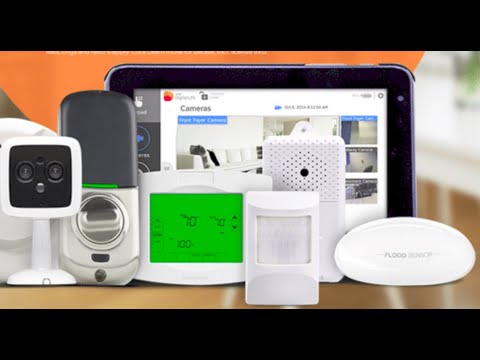
- Device Compatibility: Supported a range of Z-Wave and Wi-Fi enabled devices including door/window sensors, motion detectors, smoke detectors, water leak sensors, smart locks, and HD security cameras.
- Backup Cellular Connection: The controller included a built-in cellular backup, ensuring your system remained operational even if your home internet went down.
- Two-Way Audio: Select camera integrations allowed two-way communication, adding an extra layer of interaction and security.
Setting Up the AT&T Digital Life Controller
Setting up the AT&T Digital Life Controller was designed to be straightforward, even for users without extensive technical expertise. The process generally followed these steps:
- Placement: Position the controller in a central location in your home, ideally near your broadband router, to ensure strong wireless signal coverage to all sensors and devices.
- Power Connection: Plug the controller into a wall outlet using the included power adapter. The device needed to remain powered on at all times for continuous operation.
- Network Connection: Follow the on-screen prompts or the AT&T Digital Life app instructions to connect the controller to your home Wi-Fi network.
- Device Pairing: Use the app to scan and pair individual smart devices — door sensors, motion detectors, cameras, and locks — with the controller. Each device followed a specific pairing sequence outlined in its manual.
- System Configuration: Set up your zones, user codes, automation rules, and monitoring preferences within the app or online portal.
- Professional Monitoring Enrollment: If desired, enroll in AT&T’s professional monitoring service, which required a monthly subscription fee and provided 24/7 emergency dispatch capabilities.
Expert Tip: For the best performance, avoid placing the controller inside cabinets, behind thick walls, or near large metal appliances that could interfere with wireless signals. A central, elevated position typically yields the strongest connectivity across all your smart devices.
AT&T Digital Life Controller: How It Compares to Other Smart Home Hubs
Understanding where the AT&T Digital Life Controller fits in the broader smart home ecosystem requires comparing it with other popular hubs and controllers. The table below provides a side-by-side comparison to help you contextualize its strengths and limitations.

| Feature | AT&T Digital Life Controller | Samsung SmartThings Hub | Amazon Echo Plus (Gen 1) |
| Protocol Support | Z-Wave, Wi-Fi, Cellular Backup | Z-Wave, Zigbee, Wi-Fi, Bluetooth | Z-Wave, Zigbee, Wi-Fi, Bluetooth |
| Professional Monitoring | Yes (via AT&T Digital Life) | No (requires third-party service) | No (requires third-party service) |
| Cellular Backup | Yes | No | No |
| DIY Installation | Yes | Yes | Yes |
| Monthly Subscription | Required for monitoring | Optional for advanced features | Optional for cloud features |
| Ecosystem Breadth | Limited to AT&T Digital Life devices | Broad (hundreds of compatible devices) | Broad (Alexa-compatible devices) |
One of the most significant differentiators of the AT&T Digital Life Controller was its integrated professional monitoring and cellular backup — features that most consumer-grade hubs did not offer out of the box. However, this advantage came at the cost of a more closed ecosystem. The AT&T controller was optimized specifically for AT&T Digital Life branded devices and did not offer the vast third-party compatibility that platforms like SmartThings or Alexa ecosystems provided.
Pros and Cons at a Glance
Before making any decision about the AT&T Digital Life Controller, consider the following balanced assessment:
- Pros: Professional monitoring included, cellular backup for reliability, straightforward app interface, strong security focus, Z-Wave device compatibility for low-power sensors.
- Cons: Limited third-party device support compared to open ecosystems, AT&T Digital Life service was eventually discontinued, recurring subscription costs for monitoring, fewer automation capabilities compared to modern platforms.
The Current Status of AT&T Digital Life and Its Controller
It is important to note that AT&T officially discontinued its Digital Life smart home services. AT&T announced the wind-down of its Digital Life platform, and the controller and associated services are no longer actively supported or sold. Existing customers were migrated or offered alternatives. As of today, the AT&T Digital Life Controller is considered a legacy device and is not receiving firmware updates, new feature additions, or active technical support from AT&T.
If you are still using an AT&T Digital Life Controller, it is advisable to transition to a current smart home platform. Many of the sensors and Z-Wave devices previously paired with the controller can be migrated to other hubs such as SmartThings, Hubitat, or Wink, preserving your investment in peripheral hardware.
Migration Recommendations
For users looking to replace their AT&T Digital Life Controller, here are some practical migration steps:
- Inventory Your Devices: Make a complete list of all Z-Wave and Wi-Fi sensors, cameras, locks, and controllers currently connected to your AT&T system.
- Research Compatible Hubs: Choose a new hub that supports your existing devices’ protocols — Z-Wave hubs like SmartThings, Hubitat Elevation, or Homeseer are excellent options.
- Re-pair Devices: Follow the new hub’s inclusion process to re-pair each sensor and device one by one.
- Reconfigure Automation Rules: Rebuild your custom automation scenarios within the new hub’s app or platform.
- Set Up Monitoring: If professional monitoring was important to you, explore modern alternatives like Ring Alarm, SimpliSafe, or Cove Security, which offer comparable services with current technology.
Expert Tips for Maximizing Any Smart Home Controller
Whether you are transitioning away from the AT&T Digital Life Controller or exploring smart home hubs for the first time, these expert tips will help you get the most out of any system:
- Use a Mesh Wi-Fi System: Smart home devices rely heavily on consistent wireless connectivity. A mesh network eliminates dead zones and ensures every sensor stays connected.
- Separate Your IoT Network: Many modern routers allow you to create a dedicated IoT network. This isolates smart home traffic from your personal devices, improving both security and performance.
- Keep Firmware Updated: Always apply firmware updates to your hub and connected devices promptly, as these often include critical security patches.
- Layer Your Security: Combine your smart home controller with strong passwords, two-factor authentication, and encrypted connections to protect against unauthorized access.
- Start Small and Scale Gradually: Begin with essential sensors and cameras, then expand your setup as you become comfortable with the platform and its automation capabilities.
Frequently Asked Questions About the AT&T Digital Life Controller
1. Can I still purchase the AT&T Digital Life Controller?
The AT&T Digital Life Controller is no longer available for purchase. AT&T discontinued its Digital Life platform and the controller has been phased out of retail and official sales channels. Any units available through third-party sellers should be approached with caution, as they may not function without active service.
2. What wireless protocols does the AT&T Digital Life Controller support?
The controller primarily supported Z-Wave and Wi-Fi protocols for device communication. It also utilized a built-in cellular module for backup connectivity in the event of a home internet outage, ensuring continuous system operation.
3. Can I use my old AT&T Digital Life sensors with a new smart home hub?
Yes, in most cases. Z-Wave sensors from the AT&T Digital Life ecosystem can typically be excluded from the old controller and included in a new Z-Wave-compatible hub such as SmartThings, Hubitat, or Wink. You will need to follow the inclusion process specific to your new hub.
4. Why did AT&T discontinue Digital Life?
AT&T made the strategic decision to exit the consumer smart home security market, redirecting resources toward its core telecommunications and enterprise services. The discontinuation was gradual, with customers given advance notice and transition options.
5. Is the AT&T Digital Life Controller still secure to use?
Since AT&T no longer provides firmware updates or security patches for the Digital Life Controller, relying on it long-term carries security risks. The recommended approach is to migrate to a current platform that receives regular updates and active security monitoring.
6. How much did AT&T Digital Life monitoring cost per month?
AT&T Digital Life monitoring plans varied depending on the level of service and the number of devices enrolled. Plans typically ranged from approximately $30 to $50 per month, with additional costs for premium features such as cloud video storage and advanced automation.
Conclusion
The AT&T Digital Life Controller represented a meaningful step forward in consumer smart home automation during its active years. Its combination of professional monitoring, cellular backup, and centralized device management made it a compelling choice for homeowners seeking a turnkey smart home security solution. While the product is no longer available and the platform has been discontinued, understanding its architecture, features, and ecosystem provides valuable context for anyone navigating the current smart home landscape. Whether you are migrating away from an existing AT&T setup or researching legacy smart home technology, the lessons learned from the AT&T Digital Life Controller continue to inform best practices in modern home automation. The key takeaway is to choose a platform that aligns with your long-term goals — one that offers open device compatibility, active security updates, and scalable growth as your smart home needs evolve.