When it comes to staying connected in today’s digital world, choosing the right cable and internet services can feel overwhelming. With so many providers, speed tiers, bundles, and technologies competing for your attention, making an informed decision requires more than just picking the cheapest option off a shelf. Whether you are a remote worker who needs rock-solid upload speeds, a household juggling multiple streaming devices, or a small business owner relying on uninterrupted connectivity, understanding what cable and internet services actually offer — and how they compare — puts you in the driver’s seat. This guide breaks down everything you need to know, from the different types of connections available to practical tips for getting the best deal without overpaying.
Understanding Cable and Internet Services: What You’re Really Paying For
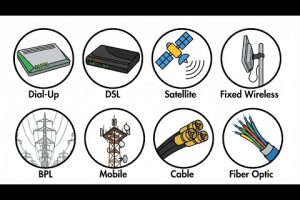
At its core, a cable and internet service delivers high-speed data connectivity to your home or business through physical infrastructure. Most people associate “cable internet” with the coaxial wiring originally built for television, but modern offerings have expanded dramatically. Today, cable internet leverages hybrid fiber-coaxial (HFC) networks, while standalone internet services may use fiber-optic lines, digital subscriber lines (DSL), or fixed wireless towers. Understanding these underlying technologies helps you evaluate not just speed claims but reliability, latency, and upload performance — factors that directly impact everything from video conferencing to online gaming.
Providers package these connectivity options into plans that vary by bandwidth, data caps, contract length, and equipment fees. Many companies now bundle cable television, telephone lines, and internet access into a single monthly invoice. While bundling can simplify billing and sometimes lower your total cost, it is not always the smartest financial move. Let us look at the primary connection types so you can judge for yourself.
Types of Cable and Internet Connections
Coaxial Cable Internet
Coaxial cable internet is the legacy workhorse of the cable industry. Originally designed to carry television signals, coaxial lines use copper conductors shielded by layers of insulation and metal braiding. This design allows broadband data to travel alongside TV channels over the same physical wire. Companies like Xfinity, Spectrum, and Cox have built vast coaxial networks across suburban and urban neighborhoods, making this one of the most widely available connection types in the United States.
Typical download speeds range from 100 Mbps to 1.2 Gbps depending on the provider and plan. However, because coaxial networks are shared among neighbors on the same node, performance can degrade during peak evening hours — a phenomenon commonly called “congestion throttling.” Upload speeds on coaxial are also modest, usually maxing out around 35 Mbps on standard tiers.
Fiber-Optic Internet
Fiber-optic technology represents the gold standard of modern connectivity. Instead of electrical signals traveling through copper, fiber uses pulses of light through ultra-thin glass or plastic strands. This delivers symmetrical speeds — meaning your upload and download rates are identical — with minimal latency and virtually no congestion during peak usage windows.
Providers like AT&T Fiber, Verizon Fios, Google Fiber, and CenturyLink offer plans starting at 300 Mbps and scaling up to 5 Gbps in select markets. Fiber is ideal for households with heavy upload demands, such as content creators, remote employees using VPNs, or smart-home ecosystems streaming security footage continuously. The catch is availability: fiber infrastructure is still limited to metropolitan areas and select suburban developments, and installation can require professional trenching or aerial line work.
DSL and Hybrid Services
Digital Subscriber Line internet uses existing telephone copper lines to deliver broadband, typically capping out around 100 Mbps for download. DSL is widely available in rural and semi-rural areas where cable and fiber have not yet been deployed. While it is slower than fiber or coaxial, DSL offers a stable, low-latency connection that suits basic browsing, email, and standard-definition streaming.
Hybrid services like fixed wireless and 5G home internet bridge the gap for underserved regions. These over-the-air solutions use cellular towers or dedicated microwave frequencies to beam internet to a receiver mounted on your property. Speeds vary from 25 Mbps to 300 Mbps depending on signal strength and network congestion, but they provide a viable alternative where wired infrastructure is absent.
How to Choose the Right Cable and Internet Plan
Selecting the ideal plan starts with understanding your actual usage patterns rather than chasing the highest advertised speed. Here is a practical framework:

- Assess your household’s concurrent usage. Count how many devices stream, game, or video conference simultaneously. A household with two remote workers and three kids streaming will need substantially more bandwidth than a single-person apartment.
- Prioritize upload speed. Download speed often gets the marketing spotlight, but upload speed determines how quickly you can send large files, join Zoom calls with HD video, and back up data to cloud storage.
- Check for data caps. Many cable providers enforce monthly data limits — typically 1.2 TB per month. Exceeding these limits triggers overage fees or speed throttling, which can be frustrating for heavy downloaders.
- Compare contract terms. Promotional pricing often locks you into a 12- or 24-month agreement. After the promotional period ends, rates can spike significantly. Look for no-contract or month-to-month options if flexibility matters to you.
- Evaluate equipment costs. Rental modems and routers add $10 to $15 per month. Purchasing your own compatible equipment can save hundreds of dollars over the life of your subscription.
Cable and Internet Bundles: Are They Worth It?
Bundling cable television with internet access remains one of the most common marketing strategies in the telecommunications industry. Providers like Spectrum, Xfinity, and Mediacom offer combined packages that discount the total monthly cost compared to purchasing each service separately. Whether this actually saves you money depends on your entertainment habits.
If you currently subscribe to multiple streaming platforms and rarely watch traditional cable channels, a cable TV bundle may add unnecessary cost. However, if you value live sports, local news, or premium movie channels, bundling can provide significant savings — especially when the promotional pricing is active.
Consider these factors before committing:
- What is the true monthly cost after the promotional period ends?
- Can you negotiate a lower rate by threatening to switch providers?
- Are there hidden fees for equipment, installation, or early termination?
- Does the bundle include phone service you will actually use?
Bundle Comparison Table
| Provider | Internet Speed | TV Included? | Promo Price | Post-Promo Price |
| Xfinity | 400 Mbps download | Yes — 150+ channels | $79.99/mo | $114.99/mo |
| Spectrum | 300 Mbps download | Yes — 125+ channels | $89.98/mo | $109.98/mo |
| AT&T Fiber | 5 Gbps symmetric | No (standalone fiber) | $55.00/mo | $55.00/mo |
| Cox | 1 Gbps download | Yes — 75+ channels | $69.99/mo | $99.99/mo |
Common Cable and Internet Problems and How to Solve Them
Even the best plans can suffer from performance issues. Slow speeds during peak hours, intermittent Wi-Fi dropouts, and modem synchronization failures top the list of consumer complaints. Here are proven troubleshooting steps:
- Restart your modem and router. A simple power cycle clears cached congestion and forces a fresh connection handshake with your provider’s network.
- Test wired speeds. Connect a laptop directly to your modem via Ethernet to determine whether slow performance is caused by your Wi-Fi network or the ISP itself.
- Update router firmware. Outdated firmware can cause security vulnerabilities and degraded performance. Most modern routers have an auto-update feature or a manufacturer app for manual updates.
- Check for node congestion. If your neighborhood shares a coaxial node, heavy evening usage can bottleneck speeds. Contact your provider to ask about node splitting or traffic management practices.
- Use a mesh Wi-Fi system. For larger homes, a single router cannot blanket every room with reliable signal. Mesh networks like Eero, Nest Wi-Fi, or TP-Link Deco distribute coverage evenly across multiple access points.
The Future of Cable and Internet Services
The cable and internet landscape is evolving rapidly. Fiber-to-the-home (FTTH) deployment continues to expand, with federal programs like the FCC’s BEAD initiative directing billions of dollars toward closing the digital divide in rural and low-income communities. Meanwhile, cable companies are upgrading their hybrid fiber-coaxial networks to deliver gigabit speeds that rival standalone fiber in many markets.
Low-earth orbit satellite constellations from SpaceX (Starlink) and Amazon (Project Kuiper) are beginning to offer competitive broadband in areas where traditional infrastructure is economically unfeasible. Fixed wireless 5G networks are also expanding, promising affordable high-speed internet without the need for physical line installation. As these technologies mature, consumers can expect more competition, better pricing, and faster speeds across the board.
Frequently Asked Questions
What is the best cable and internet service for remote work?
For remote work, fiber-optic internet is the top choice because it provides symmetrical upload and download speeds, low latency, and consistent performance regardless of the time of day. If fiber is unavailable in your area, a cable internet plan with at least 200 Mbps download and 20 Mbps upload — paired with a wired Ethernet connection — will reliably support video conferencing, file sharing, and cloud-based collaboration tools.
How much does cable and internet service cost per month on average?
The average monthly cost for a standalone cable internet plan in the United States ranges from $45 to $80, depending on the speed tier and provider. Bundled packages that include cable television and internet can start around $70 to $90 during promotional periods but typically rise to $100 or more once the discount expires. Always check the post-promotional price before signing a contract.
Can I use my own modem and router with cable internet service?

Yes, most cable internet providers allow you to use your own compatible modem and router, which can save you the monthly equipment rental fee of $10 to $15. Check your provider’s website for a list of approved devices, and verify that the modem supports the latest DOCSIS 3.1 standard for gigabit-capable performance. Purchasing your own equipment typically pays for itself within 12 to 18 months.
What is the difference between cable internet and fiber internet?
The primary difference lies in the transmission medium. Cable internet uses coaxial copper wiring originally designed for television, while fiber-optic internet uses glass or plastic strands that transmit data as pulses of light. Fiber delivers symmetrical speeds, significantly lower latency, and superior consistency during peak usage, whereas cable internet is shared among neighbors and can experience speed fluctuations during high-traffic periods.
Are there any data caps on cable internet plans?
Many cable providers enforce a monthly data cap, commonly set at 1.2 terabytes per month. Exceeding this limit may result in additional charges of $10 to $15 per 50 GB block or a temporary reduction in speeds. Fiber providers like AT&T Fiber and Google Fiber generally do not impose data caps, making them a better option for heavy downloaders and multi-device households.
Conclusion
Cable and internet services are the backbone of modern daily life, and selecting the right provider and plan requires more than impulse decisions based on flashy advertisements. By understanding the technologies behind each connection type, evaluating your real-world usage needs, and scrutinizing contract terms and hidden fees, you can secure a reliable, cost-effective internet experience that serves your household or business for years to come. Stay informed, compare options regularly, and never hesitate to negotiate — your loyalty is only valuable as long as the service remains competitive.