


Automating your house has evolved from a futuristic luxury into an attainable, practical upgrade for homeowners who want more control, convenience, and efficiency in their daily lives. Whether you are looking to simplify routine tasks, improve energy efficiency, or boost home security, home automation offers a spectrum of solutions tailored to every budget and technical comfort level. This comprehensive guide walks you through everything you need to know about automating house systems, from getting started as a complete beginner to building a fully integrated smart home ecosystem that rivals what professional installers offer.
What Does Automating a House Actually Mean?
At its core, automating house operations means using interconnected devices and software to control lighting, climate, entertainment, security, and appliance functions with minimal manual intervention. A smart home ecosystem leverages wireless protocols like Zigbee, Z-Wave, Wi-Fi, and Matter to let devices communicate with each other and respond to triggers, schedules, voice commands, or sensor inputs. Understanding this foundation helps you make informed decisions about which platforms, protocols, and devices align with your lifestyle goals.
Key Components of a Home Automation Setup
Every automated house relies on several foundational layers working together:
- Hub or Controller — The brain of your system, such as a SmartThings hub, Home Assistant server, or Amazon Echo, that coordinates all connected devices.
- Sensors and Triggers — Motion detectors, door/window sensors, temperature monitors, and light sensors that gather real-time data.
- Actuators and Smart Devices — Smart plugs, switches, locks, thermostats, and motorized blinds that execute commands based on triggers.
- Network Infrastructure — A reliable mesh Wi-Fi system or dedicated hub network that ensures stable communication between devices.
- User Interface — Apps, dashboards, voice assistants, or wall-mounted panels through which you monitor and control your home.
Getting Started: Beginner-Level Home Automation
If you are new to the world of automating house functions, the most effective approach is to start small and think about the problem you want to solve first. Avoid the temptation to buy every smart device at once. Instead, identify one or two pain points — maybe you forget to turn off lights at night or want to save money on heating — and build around those needs.
Best Starter Devices for Newcomers
These devices offer the easiest entry point into home automation without requiring electrical rewiring:
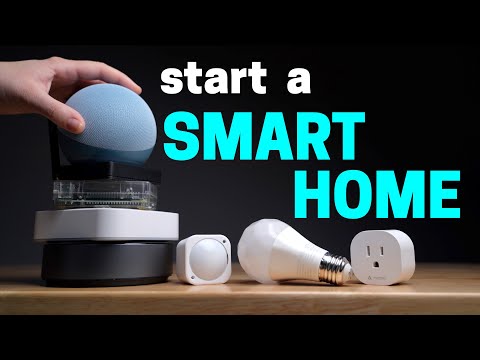
- Smart Plugs and Outlets — Products like the TP-Link Kasa or Wemo Mini let you turn any plugged-in device into a smart device. Schedule lamps, fans, or coffee makers to turn on and off automatically.
- Smart Bulbs — Philips Hue or LIFX bulbs allow color-changing, dimming, and scheduling without replacing your entire light fixture.
- Voice Assistants — Amazon Echo or Google Nest Mini serve as affordable voice controllers that tie your initial devices together.
- Smart Thermostat — The Nest Thermostat or Ecobee learns your schedule and adjusts heating and cooling to reduce energy waste.
Expert tip: Choose a single ecosystem to start — either Google Home, Amazon Alexa, or Apple HomeKit — to avoid compatibility headaches. You can always expand later, but staying within one platform keeps things manageable.
Intermediate Automation: Building Scenes and Routines
Once you have a handful of smart devices, the real magic begins when you start creating automated routines that connect multiple devices into coordinated actions. This intermediate stage is where most homeowners experience a significant jump in convenience and energy savings.
Example Automation Routines You Can Build Today
- Good Morning Routine — When your alarm goes off, gradually brighten bedroom lights to 70%, start the coffee maker, and set the thermostat to your daytime temperature.
- Away Mode — A single voice command or geofence trigger turns off all lights, locks doors, adjusts the thermostat, and activates security cameras.
- Movie Night — Dim lights to 15%, lower motorized blinds, turn on the smart TV, and switch the soundbar to cinema mode.
- Energy Saver — Automatically reduce heating when no one is home and pre-warm the house 30 minutes before your expected return.
Platforms like Home Assistant, IFTTT, and native ecosystem routines in Alexa or Google Home make building these sequences intuitive. The key insight is that automations should feel invisible — you should not need to think about turning them on.
Advanced Home Automation: Full Integration and Customization
For enthusiasts and tech-savvy homeowners, advanced house automation means building a fully custom system where every device, sensor, and actuator operates in harmony. This tier often involves self-hosted platforms, custom scripting, and deep integration with third-party services.

Home Assistant: The Power User’s Choice
Home Assistant has become the gold standard for advanced home automation enthusiasts because it supports virtually every protocol and device brand. Unlike proprietary ecosystems that lock you into a single vendor, Home Assistant runs on a Raspberry Pi or a dedicated mini PC and unifies devices from Philips Hue, Ring, Shelly, Sonoff, and hundreds of other brands under one dashboard. You can write custom automation logic using YAML, integrate weather APIs, set up complex conditional triggers, and maintain complete data ownership since everything runs locally.
Matter and Thread: The Future of Interoperability
The introduction of the Matter protocol has been a game-changer for automating house systems across brands. Matter is an open-source standard backed by Apple, Google, Amazon, and the Connectivity Standards Alliance. It allows devices from different manufacturers to communicate seamlessly without proprietary bridges. Thread, the networking layer beneath Matter, creates a self-healing mesh network that improves reliability and reduces congestion on your Wi-Fi.
If you are planning a long-term automation strategy, prioritize Matter-certified devices and Thread-capable hubs. This future-proofs your investment and ensures compatibility as the ecosystem matures.
Comparing Popular Home Automation Platforms
Choosing the right platform is one of the most consequential decisions when automating house operations. The table below compares leading options across key criteria relevant to different user experience levels.
| Platform | Best For | Device Compatibility | Complexity | Local Control | Cost |
| Amazon Alexa | Beginners, voice-first users | Very broad, 100,000+ skills | Low | Limited cloud-dependent | Free ( Echo devices $50+) |
| Google Home | Android users, search integration | Broad, strong Nest integration | Low | Limited cloud-dependent | Free ( Nest Hub $100+) |
| Apple HomeKit | Apple ecosystem users, privacy | Moderate, curated selection | Low to Medium | Partial (HomePod local) | $99 (Apple TV hub) |
| SmartThings | Intermediate users, broad support | Very broad, 10,000+ devices | Medium | Partial (SmartThings Hub) | $70 (hub) + subscriptions |
| Home Assistant | Advanced users, full control | Nearly unlimited with integrations | High | Yes, fully local | $0 software, hardware $35+ |
Expert Tips for a Successful Automation Journey
- Start with your network. A robust mesh Wi-Fi system (such as Eero or Orbi) or a dedicated Zigbee/Z-Wave hub prevents dropped connections that ruin automations.
- Think in scenes, not just devices. Group devices into functional scenes so you control the outcome, not individual switches.
- Prioritize reliability over flashiness. A simple automated light schedule is more valuable than a complex voice-triggered setup that fails half the time.
- Secure your network. Use a separate VLAN or guest network for IoT devices to isolate them from your personal computers and data.
- Document your automations. Keep a simple spreadsheet or note of every automation rule you create so you can troubleshoot when something behaves unexpectedly.
- Plan for the long term. Choose devices and protocols that are likely to remain supported, prioritizing Matter certification where possible.
How Much Does It Actually Cost to Automate a House?
The investment required for automating house operations varies dramatically depending on your ambition and starting point. A basic starter kit with a smart speaker, three smart bulbs, and a smart plug can be set up for under $150. A more comprehensive setup with a dedicated hub, smart thermostat, door locks, sensors, and motorized blinds typically ranges from $500 to $1,500. Full-scale advanced installations with multi-room integration, custom wiring, and professional-grade controllers can run $3,000 to $15,000 or more, though many enthusiasts build comparable systems for under $1,000 using open-source software and consumer hardware.
The most important takeaway is that you do not need to automate everything at once. The beauty of modern home automation lies in its modularity — you can add one device, one routine, and one room at a time, letting the system grow organically with your needs and budget.
Conclusion
Automating your house is less about chasing the latest gadget and more about thoughtfully designing a living environment that works for you. Whether you start with a single smart plug, build elaborate routines across dozens of devices, or deploy a fully local Home Assistant server, the journey toward a smarter home is both rewarding and endlessly customizable. The technology has matured to the point where reliability, interoperability, and ease of use are no longer compromises. Start with a clear vision of what you want to improve in your daily life, invest in a solid foundation, and let your automation journey evolve naturally over time.
Frequently Asked Questions
What does automating house mean in simple terms?
Automating a house means using smart devices and software to control lighting, climate, security, and appliances automatically based on triggers, schedules, or voice commands, reducing the need for manual operation.
Can you automate an existing house without major renovation?
Absolutely. Most modern home automation solutions are wireless and non-invasive. Smart plugs, battery-operated sensors, and Wi-Fi devices can be installed in minutes without any electrical work or structural changes.
Is automating a house worth the investment?
Yes, for most homeowners. Beyond the convenience factor, automated systems can reduce energy bills by 10 to 25 percent through intelligent climate and lighting control, and smart security setups can lower insurance premiums while providing real-time peace of mind.
What is the difference between a smart home and an automated house?
A smart home focuses on connected devices that you can monitor and control remotely, while an automated house emphasizes self-executing routines and triggers that operate independently with minimal human input. The two concepts overlap, but true automation means the system acts on its own based on predefined logic.
What is the best platform for automating a house?
There is no single best platform. Amazon Alexa and Google Home are ideal for beginners, SmartThings suits intermediate users wanting broad compatibility, and Home Assistant is the top choice for advanced users who want full local control and customization. The best choice depends on your technical comfort level and long-term goals.
How long does it take to set up a basic home automation system?
A basic system with a smart speaker, a few smart plugs, and a couple of routines can be fully operational within one to two hours. More complex setups involving hubs, sensors, and custom automations may take several days of planning and gradual implementation.