


When most PC enthusiasts think about building or buying a high-performance gaming rig, the name ASUS inevitably comes up. The company has spent over two decades refining its gaming lineups under the Republic of Gamers (ROG) brand and the more budget-friendly TUF Gaming division. Whether you are a college student looking for an affordable entry point or a hardcore competitive gamer chasing the highest frame rates, ASUS gaming PCs deliver a compelling combination of cutting-edge hardware, distinctive aesthetics, and real-world reliability. In this deep dive, we will explore everything you need to know about ASUS gaming desktops and laptops, compare their flagship lines, break down key specs, and help you choose the right machine for your specific needs.
Why ASUS Gaming PCs Stand Out in a Crowded Market
ASUS has built a reputation for engineering excellence that goes beyond just slapping high-end parts inside a case. The company invests heavily in thermal design, power delivery, and software tuning through tools like Armoury Crate and AI Suite. This level of attention to detail means that an ASUS gaming PC often runs quieter and cooler than competing builds at the same price point. Moreover, ASUS offers an extraordinary warranty experience, including international support and accidental damage protection on many models. The brand also maintains tight quality control on component selection, using premium capacitors, reinforced PCIe slots, and high-efficiency VRMs that extend the lifespan of the system significantly.
From a software ecosystem perspective, ASUS gaming machines come bundled with features like GameFirst for network optimization, GPU Tweak II for graphics card tuning, and MyLogo2 for custom boot animations. These tools may seem minor individually, but together they create a polished user experience that sets ASUS apart from generic OEM competitors.
ASUS Gaming PC Product Lines Explained

ROG Strix: The Flagship Powerhouse
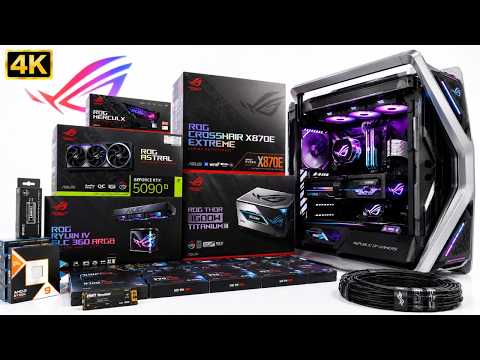
The ROG Strix series represents ASUS’s absolute premier gaming lineup. These machines are built for enthusiasts who demand uncompromised performance and want every bell and whistle. The ROG Strix desktop features top-tier Intel Core i9 or AMD Ryzen 9 processors paired with NVIDIA GeForce RTX 4080 or 4090 graphics cards. Cooling is handled by large 360mm or 420mm radiator configurations, and the chassis includes multiple RGB zones controlled through the proprietary Aura Sync software. The Strix line also includes high-end laptops with 240Hz QHD displays and per-key RGB keyboards, making them ideal for both desktop replacement and LAN party scenarios.
ROG Flow: Hybrid Performance and Portability
The ROG Flow series blurs the line between tablet and gaming laptop. These 2-in-1 devices feature OLED displays with 120Hz refresh rates and support ASUS Pen input for creative workflows alongside gaming. The ROG Flow X13 is particularly noteworthy because it delivers desktop-class Radeon RX 6800M GPU performance in an ultraportable chassis that weighs under 1.5 kg. This makes it one of the most powerful truly portable gaming machines available.
TUF Gaming: Reliable Performance at an Accessible Price
TUF Gaming is ASUS’s value-oriented line that still meets military-grade durability standards (MIL-STD-810H). TUF Gaming desktops use slightly more conservative component selections — typically Intel Core i5 or AMD Ryzen 5 paired with NVIDIA RTX 4060 or 4070 GPUs — but they maintain the same robust build quality as the more expensive ROG models. The TUF line is perfect for beginner and intermediate gamers who want a machine that can handle modern titles at 1080p or 1440p without breaking the bank. Laptops in this series offer 144Hz IPS panels and durable MIL-STD-810H chassis that can survive the wear and tear of daily student life.
ROG Zephyrus: Sleek Performance Laptops
The ROG Zephyrus series focuses on thin-and-light gaming laptops that do not sacrifice thermal performance for portability. Using ASUS’s proprietary Active Aerodynamic System (AAS), the Zephyrus chassis opens slightly at the rear to increase airflow by up to 30% compared to a standard laptop design. These machines feature Intel 14th Gen Core processors or AMD Ryzen 7000 series chips and NVIDIA RTX 40-series mobile GPUs, all packed into profiles under 18mm thick.
ASUS Gaming Desktop vs. Laptop: Which Should You Choose?
Choosing between a desktop and a laptop depends largely on your use case, budget, and lifestyle. The table below breaks down the key differences between ASUS gaming desktops and laptops to help you make an informed decision.
| Feature | ASUS ROG Desktop | ASUS ROG Laptop |
|---|---|---|
| Upgradeability | Full — CPU, GPU, RAM, storage all replaceable | Limited — RAM and SSD usually upgradeable |
| Raw Performance | Significantly higher — desktop-class GPUs | Excellent — mobile GPUs are slightly below desktop equivalents |
| Portability | Stationary — requires dedicated desk space | Highly portable — designed for mobility |
| Thermal Headroom | Superior — large cases with multiple fans | Good — compact but well-engineered cooling |
| Price at Equivalent Performance | Lower — desktops deliver more per dollar | Higher — premium for compact engineering |
| Peripherals Required | Monitor, keyboard, mouse needed separately | Integrated screen and keyboard included |
If you prioritize raw performance, upgradeability, and long-term value, an ASUS gaming desktop is the clear winner. If you need portability for classes, work trips, or LAN parties, the ROG Zephyrus or TUF Gaming laptop line delivers impressive gaming performance in a portable form factor.
Key Specifications to Look For in an ASUS Gaming PC
When evaluating any ASUS gaming PC, understanding the core specifications helps you avoid bottlenecks and get the best value. Here are the critical components to focus on:
- Processor (CPU): The brain of the system. Intel Core i5/i7/i9 14th Gen and AMD Ryzen 5/7/9 7000 series are the current standards. For competitive esports titles like Valorant or CS2, an i5 or Ryzen 5 is more than sufficient. For AAA gaming and streaming simultaneously, invest in an i7 or Ryzen 7.
- Graphics Card (GPU): NVIDIA GeForce RTX 4060 is the sweet spot for 1080p gaming, while the RTX 4070 Ti and above unlock high refresh rates at 1440p and 4K. ASUS Strix models often feature factory-overclocked variants that squeeze out extra frames.
- RAM: 16GB DDR5 is the current minimum recommendation. For heavy multitasking or content creation, 32GB provides headroom. Check that the motherboard supports the speed you need — ASUS ROG boards typically support DDR5-6000 and above.
- Storage: NVMe Gen4 SSDs offer read speeds exceeding 5000 MB/s, drastically reducing game load times. Look for at least 1TB of storage, with many ASUS systems offering dual M.2 slots for expansion.
- Power Supply (PSU): ASUS uses 80+ Gold and Platinum rated PSUs in the Strix line, ensuring efficient and stable power delivery even under heavy loads.
- Cooling System: Custom liquid cooling loops in the ROG Maximus motherboard ecosystem allow for sustained high-clock speeds without thermal throttling.
Expert Tips for Getting the Most From Your ASUS Gaming PC

- Enable XMP Profiles in BIOS: Most ASUS gaming PCs ship with DDR5 RAM running at JEDEC base speeds (4800MHz). Enabling the XMP or EXPO profile in BIOS instantly boosts memory to its rated speed, often improving gaming performance by 5-10%.
- Use Armoury Crate for Performance Profiles: Switch between Silent, Performance, and Turbo modes depending on your workload. Turbo mode maximizes cooling and clock speeds for intense gaming sessions.
- Keep GPU Drivers Updated via ASUS GPU Tweak II: ASUS software provides one-click driver updates optimized for their specific card models, ensuring you always have the latest Game Ready drivers.
- Prioritize Cable Management for Airflow: Even in pre-built systems, routing cables behind the motherboard tray can improve intake airflow by 15-20%, lowering component temperatures noticeably.
- Monitor Thermals Regularly: Use ASUS’s built-in monitoring tools or third-party apps like HWiNFO to track CPU and GPU temperatures. Sustained temperatures above 85°C on the GPU warrant a fan curve adjustment or dust cleaning.
Frequently Asked Questions About ASUS Gaming PCs
Is an ASUS ROG Strix desktop worth the premium over a standard ROG build?
Yes, if you value factory overclocking, superior cooling solutions, and extensive RGB customization. The Strix models come with higher-wattage PSUs, reinforced PCIe power connectors, and aggressive fan profiles that outperform reference designs. However, if you are on a tighter budget, a TUF Gaming or standard ROG desktop delivers excellent performance at a lower price point.
Can I upgrade the GPU in an ASUS gaming laptop?
No, laptop GPUs are soldered to the motherboard and cannot be replaced. However, you can upgrade the RAM and SSD in most ASUS gaming laptops, which provides meaningful performance improvements in modern titles that benefit from faster storage and increased memory bandwidth.
What warranty does ASUS offer on its gaming PCs?
ASUS typically provides a 2-year international warranty on desktop components and a 1-year warranty on laptops. Many ROG Strix models include 3-year coverage, and accidental damage protection can be purchased as an extended option. This warranty support is among the best in the PC industry.
How does Armoury Crate compare to other gaming software suites?
Armoury Crate is ASUS’s unified software platform that replaces the older GPU Tweak II, Fan Xpert, and MyASUS apps. It provides centralized control over system performance profiles, RGB lighting, fan curves, and system monitoring. While some users find the interface slightly resource-heavy, the integration of all tuning features into one application is a significant convenience advantage over fragmented third-party solutions.
Which ASUS gaming PC is best for 4K gaming in 2024?
The ROG Strix desktop equipped with an NVIDIA GeForce RTX 4090 GPU and an Intel Core i9-14900KS or AMD Ryzen 9 7950X processor is the top recommendation for native 4K gaming. Pair it with a minimum of 32GB DDR5 RAM and a Gen4 NVMe SSD of 2TB or more to eliminate all potential bottlenecks at ultra-high resolutions.
Are ASUS TUF Gaming PCs suitable for competitive esports?
Absolutely. TUF Gaming desktops with an RTX 4060 or 4070 and a solid i5 or Ryzen 5 processor can easily push 144fps and above in titles like Valorant, Apex Legends, and Rocket League at 1080p. The reliable cooling and durable components also ensure consistent performance during long tournament sessions.
Final Verdict
ASUS gaming PCs represent one of the most comprehensive and well-engineered product ecosystems in the personal computing industry today. Whether you gravitate toward the uncompromising power of the ROG Strix, the rugged reliability of TUF Gaming, the portability of the ROG Zephyrus, or the versatility of the ROG Flow, ASUS offers a solution tailored to nearly every type of gamer. The company’s commitment to build quality, thermal engineering, software integration, and after-sales support gives ASUS gaming PCs a distinct advantage over many competitors. By understanding the product lines, knowing which specifications matter most for your use case, and following the expert tips outlined above, you can confidently choose an ASUS gaming PC that delivers years of excellent performance and gaming enjoyment.