


If you have been exploring the world of home automation, you have almost certainly come across the Amazon Alexa smart home system. What started as a voice-controlled assistant embedded in a single speaker has evolved into one of the most expansive ecosystems for connected living on the planet. Whether you are a curious beginner looking to automate a single light bulb or a tech enthusiast managing an entire household of smart devices, understanding how the Alexa smart home ecosystem operates can save you time, money, and frustration. This guide breaks down everything you need to know, from the fundamentals to advanced configuration strategies that bring your home to life.
What Is the Amazon Alexa Smart Home System?
The Amazon Alexa smart home system refers to the entire network of hardware devices, software services, and third-party integrations that work together to let you control your home using voice commands and automated routines. At its core, Alexa is a cloud-based voice service developed by Amazon that powers devices like the Echo speaker family, the Echo Show displays, and a vast array of compatible smart products from brands like Philips Hue, TP-Link, Wyze, Ring, and dozens more. Unlike closed proprietary systems, Alexa serves as an open platform, meaning virtually any manufacturer can build compatibility into their products.
The system relies on Amazon’s cloud infrastructure to process natural language commands, execute actions, and learn from your usage patterns over time. This cloud-dependent architecture is what allows Alexa to continuously improve its understanding of your voice, respond to increasingly complex requests, and support third-party skills that expand its functionality well beyond basic home control.
How the Alexa Smart Home Ecosystem Actually Works
Understanding the mechanics behind the Amazon Alexa smart home system helps you troubleshoot issues and make smarter purchasing decisions. Here is a simplified breakdown of the process:
- Wake Word Detection: Your Alexa-enabled device listens locally for a wake word, typically “Alexa,” “Echo,” or a custom name you have chosen.
- Audio Streaming to the Cloud: Once triggered, the device streams your audio snippet to Amazon’s cloud servers for processing.
- Natural Language Processing: Amazon’s algorithms parse your request, identify intent, and extract relevant entities such as device names, room names, or specific actions.
- Command Execution: The cloud sends instructions back to the device or relays commands to compatible smart home devices through the cloud or local network.
- Feedback and Response: Alexa delivers a spoken confirmation, triggers an action like turning off lights, or updates your routine based on the command.
One critical detail that many users overlook is the difference between cloud-based and local processing. Amazon has been gradually expanding local processing capabilities, particularly with newer Echo devices powered by the AZ1 Neural Edge processor. This means certain commands execute faster and even work during internet outages, significantly improving reliability for smart home automation.
Key Components You Need to Build an Alexa Smart Home Setup
A robust Alexa smart home system is built from several layers of hardware and software working in harmony. Here are the essential components:
Smart Speakers and Displays
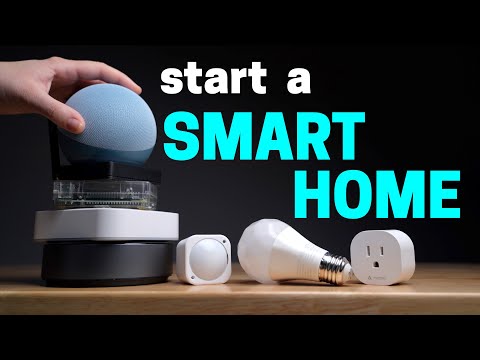
These are the central hubs of your setup. The Amazon Echo lineup includes options for every room and budget. The Echo Dot is the most affordable entry point, perfect for bedrooms or kitchens. The Echo Studio delivers premium 3D audio, making it ideal for living rooms. The Echo Show adds a visual display, which is particularly valuable for video calls with Ring doorbell cameras or viewing security feeds from your Alexa-compatible cameras.
Expert tip: Place at least one Echo device on each floor of your home and in high-activity rooms like the kitchen and living room. This improves voice recognition accuracy and ensures commands reach the right device.
Compatible Smart Devices
Alexa’s true power emerges when you connect smart devices across multiple categories. The ecosystem supports smart lighting, smart plugs, thermostats, locks, cameras, sensors, robot vacuums, and even smart kitchen appliances. Each device must be compatible with Alexa, either natively or through a third-party bridge like the Philips Hue Bridge or Samsung SmartThings Hub.
Popular Alexa-Compatible Smart Home Devices Compared
Choosing the right devices can be overwhelming given the sheer number of options. Below is a comparison of some of the most popular categories and brands within the Alexa smart home system.
| Device Category | Popular Brands | Typical Price Range | Key Feature |
| Smart Bulbs | Philips Hue, LIFX, Wyze | $10 – $60 per bulb | Color changing, dimming, scheduling |
| Smart Plugs | TP-Link Kasa, Wemo, Amazon Smart Plug | $10 – $25 per plug | Remote on/off control, energy monitoring |
| Smart Thermostats | Ecobee, Nest, Amazon Smart Thermostat | $100 – $250 | Learning algorithms, energy savings |
| Smart Locks | August, Yale, Schlage Encode | $150 – $300 | Keyless entry, auto-lock, guest access |
| Video Doorbells | Ring, Nest, Arlo | $100 – $250 | Two-way audio, motion alerts, cloud storage |
| Robot Vacuums | iRobot Roomba, Roborock, Ecovacs | $200 – $800 | Voice-controlled cleaning, mapping |
When building your setup, prioritize devices that support native Alexa integration. These typically offer the smoothest setup experience, requiring no additional hubs or bridges. Look for the “Works with Alexa” badge on product packaging as your quick visual indicator of compatibility.
Setting Up Your Amazon Alexa Smart Home System Step by Step
Getting started is simpler than most people expect. Follow these practical steps to have your system running within an hour.
- Choose Your Hub: Pick an Echo device based on your needs and budget. Connect it to power and your Wi-Fi network using the Alexa app on your smartphone.
- Create Device Groups: In the Alexa app, group devices by room — for example, “Living Room,” “Bedroom,” or “Kitchen.” This allows you to say commands like “Alexa, turn off the living room lights” without specifying each device individually.
- Add Compatible Devices: Navigate to the “Devices” section in the Alexa app and tap “Add Device.” Follow the manufacturer’s pairing instructions. Most modern devices use Bluetooth, Wi-Fi, or a dedicated hub to connect.
- Set Up Routines: Routines are the secret weapon of any Alexa smart home system. You can create automated sequences triggered by a voice command, a time of day, or a sensor event. For example, a “Good Morning” routine could turn on lights, start a coffee maker, and read your daily news briefing.
- Enable Skills: Alexa Skills are essentially apps for your voice assistant. Browse the Skills section to add functionality, such as controlling Spotify, ordering groceries, or integrating with additional third-party services.
Beginner, Intermediate, and Advanced Alexa Smart Home Strategies

Beginner Level: Get the Basics Right
If you are new to smart home technology, start with one or two device categories. A smart plug and a smart bulb are excellent starting points. Use the Alexa app to name each device clearly, such as “Bedroom Lamp” or “Living Room Fan.” Practice basic voice commands like “Alexa, turn on the bedroom lamp” and “Alexa, set the living room light to 50 percent.” Once you are comfortable, explore creating a simple routine that automates your evening wind-down.
Intermediate Level: Build Automation and Scenes
At this stage, you understand how individual devices work and want to connect them meaningfully. Start building multi-device scenes that change the entire ambiance of a room with a single command. For example, a “Movie Night” scene could dim the lights, close smart blinds, and switch your TV input. Explore conditional routines that trigger based on time, weather, or sensor data — like turning on a hallway light when motion is detected after sunset.
Advanced Level: Leverage Third-Party Integrations and Local Control
Power users take full advantage of the Alexa smart home system’s extensibility. Integrate platforms like Home Assistant, which acts as a unified control layer for devices that do not natively support Alexa. Explore Matter and Thread support, which Amazon has been adopting as a universal smart home standard, enabling seamless cross-ecosystem compatibility. Set up custom routines using external triggers from services like IFTTT or Alexa Guard for home monitoring while you are away.
Expert Tips to Get More Out of Your Alexa Smart Home
- Use Voice Profiles: Register each family member’s voice so Alexa can personalize responses, recognize individual preferences, and restrict access to certain features for children.
- Optimize Wi-Fi Coverage: Smart devices rely on a stable network. Consider a mesh Wi-Fi system if your home has dead zones, as unreliable connectivity is the number one cause of Alexa smart home failures.
- Name Devices Consistently: Avoid special characters or similar-sounding names. “Kitchen Light” and “Kitchen Fan” are far easier to distinguish than “Kitchen Light” and “Kitchen Lite.”
- Use the Drop-In Feature for Intercom: Enable Drop In on Echo devices to create a household intercom system, useful for calling family members in different rooms without dialing a phone number.
- Enable Guard for Home Security: Alexa Guard listens for unusual sounds like smoke alarms or breaking glass and sends alerts to your phone when you are away from home.
Frequently Asked Questions About the Amazon Alexa Smart Home System
Can I use an Alexa smart home system without an Amazon Echo speaker?
Yes, you can control Alexa-compatible smart devices through the Alexa app on your smartphone or tablet without owning any Echo hardware. However, having at least one Echo device provides hands-free voice control, which is the primary convenience the system offers.
Does the Alexa smart home system work without an active internet connection?
Most Alexa commands require cloud connectivity. However, newer Echo devices with local processing capabilities can handle basic commands like turning lights on or off even when the internet is down. Smart devices connected through a local hub like Zigbee or Z-Wave may also continue functioning independently of the cloud.
Is the Alexa smart home system secure from hacking and unauthorized access?
Amazon employs multiple layers of security including voice recognition, two-factor authentication for account access, and regular firmware updates. To maximize security, use strong passwords, enable two-step verification in your Amazon account settings, and keep your Echo devices updated to the latest software version.
What is the difference between Alexa routines and Alexa scenes, and which should I use?
A routine triggers a sequence of actions based on a specific condition, such as a time of day or a voice command. A scene is a preset configuration that sets multiple devices to specific states simultaneously. For example, a routine might trigger a scene called “Movie Night” at 8 PM every Friday. Using both together gives you the most powerful automation experience.
Can I integrate non-Alexa smart home devices into the Alexa system?
Absolutely. Many third-party devices work through cloud-based bridges or hubs. Platforms like Philips Hue, Samsung SmartThings, and Nest all integrate with Alexa either natively or through the Alexa app’s device discovery feature. Amazon’s growing support for the Matter protocol is making cross-platform integration even more seamless.
How many smart devices can the Alexa smart home system support in a single household?
There is no hard limit imposed by Amazon. Users routinely manage 50, 100, or more connected devices within a single Alexa household. Performance may depend on your Wi-Fi network strength and the complexity of your routines. Organizing devices into logical groups and rooms within the Alexa app helps maintain responsiveness at scale.
Final Thoughts: Is the Amazon Alexa Smart Home System Worth It?
The Amazon Alexa smart home system remains one of the most accessible, versatile, and deeply integrated home automation platforms available today. Its open ecosystem, continuous software updates, and expanding compatibility with the Matter standard make it a future-proof investment for any homeowner. Whether you automate a single smart plug to save energy or orchestrate an entire home of interconnected devices through sophisticated routines, Alexa provides the tools to make your living space more convenient, efficient, and secure. Start small, learn the system’s capabilities, and gradually expand as your confidence and needs grow. The result is a home that not only responds to your voice but anticipates your lifestyle.