Cable internet remains one of the most widely adopted broadband solutions across the United States and around the world. Millions of households rely on coaxial cable television infrastructure to deliver high-speed connectivity for streaming, remote work, online gaming, and everyday browsing. If you are shopping for a new internet plan or simply trying to understand what makes cable internet tick, this comprehensive guide covers everything from the underlying technology and speed tiers to practical tips for getting the most out of your connection.
What Is Cable Internet and How Does It Work
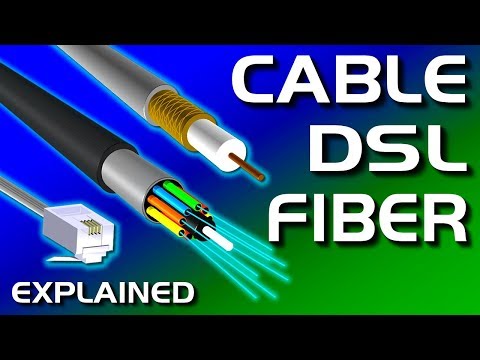
Cable internet is a type of broadband connection that transmits data through the same coaxial cable infrastructure originally designed for cable television. These cables consist of copper shielding wrapped around a central conductor, allowing them to carry large volumes of data at impressive speeds. The signal travels from your internet service provider’s headend through a network of coaxial lines and into your home, where a cable modem translates the incoming signal into usable internet data.
One of the biggest advantages of cable internet is its widespread availability. Because it leverages existing television networks, most urban and suburban neighborhoods already have cable lines running to their homes. This means you often do not need new installations or extensive construction to get connected. A coaxial cable connects to a modem in your house, which then distributes internet access to your devices via Wi-Fi or Ethernet.
The technology behind cable internet relies on a shared infrastructure model, meaning your neighbors on the same node share bandwidth. While this can lead to congestion during peak usage hours, modern networks use advanced segmentation and node splitting techniques to minimize slowdowns and maintain consistent performance for subscribers.
Cable Internet Compared to Other Connection Types
Understanding how cable internet stacks up against DSL, fiber optic, and satellite connections is essential for making an informed decision. Each technology has distinct strengths and limitations that affect speed, reliability, latency, and overall value.
Cable Internet vs DSL
DSL, or Digital Subscriber Line, delivers internet through traditional telephone lines. While DSL is widely available and typically more affordable than cable, it offers significantly lower maximum speeds. Cable internet generally provides download speeds ranging from 50 Mbps to over 1 Gbps on most plans, while standard DSL plans cap out around 25 to 100 Mbps. Additionally, cable connections tend to have more consistent upload speeds compared to older DSL deployments. If you need reliable performance for multiple simultaneous users and bandwidth-heavy activities like 4K streaming or video conferencing, cable internet usually outperforms DSL in real-world scenarios.

Cable Internet vs Fiber Optic
Fiber optic technology uses glass or plastic strands to transmit data as pulses of light, delivering the fastest and most stable connections available today. Fiber offers symmetrical upload and download speeds, extremely low latency, and virtually no degradation over distance. Cable internet, while fast, typically offers faster download than upload and can experience more variability under heavy network load. However, fiber availability remains limited to certain metropolitan and suburban areas, making cable internet the go-to choice for millions of users who do not have fiber access in their neighborhoods.
Cable Internet vs Satellite
Satellite internet serves rural and remote areas where ground-based infrastructure is not available. While it provides a lifeline for underserved communities, satellite connections suffer from high latency due to the signal traveling to orbiting satellites and back. Cable internet, by contrast, uses terrestrial infrastructure that delivers dramatically lower latency and faster real-world speeds. For anyone who has access to cable internet, it is almost always the superior choice in terms of performance and consistency.
| Connection Type | Typical Download Speed | Typical Upload Speed | Latency | Availability |
| Cable Internet | 50 – 1,200 Mbps | 5 – 50 Mbps | 15 – 30 ms | Urban & suburban areas |
| DSL | 5 – 100 Mbps | 1 – 10 Mbps | 25 – 55 ms | Widespread |
| Fiber Optic | 250 – 9,400 Mbps | 250 – 9,400 Mbps | 1 – 10 ms | Select metro areas |
| Satellite | 12 – 150 Mbps | 3 – 10 Mbps | 500 – 700 ms | Nationwide (rural) |
How to Choose the Right Cable Internet Plan
Selecting the ideal cable internet plan requires evaluating several factors, including your household size, typical usage patterns, and budget. Here are key considerations to guide your decision:
- Household size and device count: A single person working from home with two or three devices needs a very different plan than a family of five streaming, gaming, and video calling simultaneously.
- Usage intensity: Casual browsing and email require far less bandwidth than 4K streaming, large file uploads, or competitive online gaming.
- Download vs upload needs: If you regularly upload large videos, host video calls, or work with cloud-based files, prioritize plans with higher upload speeds.
- Data caps and overage fees: Many cable providers impose monthly data caps ranging from 1 TB to unlimited. Check your provider’s policy carefully to avoid surprise charges.
- Contract terms and promotional pricing: Introductory rates are common, but standard pricing often increases significantly after the first 12 months. Read the fine print before signing.
- Equipment costs: Some providers include a modem and router in the plan, while others charge a monthly rental fee or require you to purchase your own equipment.
As a general rule, most households benefit from a plan offering at least 200 Mbps download speed, which comfortably supports multiple users and devices. Power users and large families should consider 400 Mbps or higher to ensure smooth performance during peak hours.
Cable Internet Speed Tiers Explained
Cable internet providers typically offer tiered plans that vary in speed, price, and included features. Understanding what each tier delivers helps you match your plan to your actual needs without overpaying for speed you will never use.
- Basic tier (50 – 100 Mbps): Ideal for light users who browse the web, check email, and stream standard-definition video. Sufficient for one or two people with modest device usage.
- Mid-tier (200 – 400 Mbps): The sweet spot for most households. Handles 4K streaming on multiple screens, online gaming, and video conferencing without noticeable slowdowns. This is the most popular tier among cable internet subscribers.
- High-tier (500 – 1,000+ Mbps): Designed for power users, smart homes with dozens of connected devices, and households where multiple people engage in heavy bandwidth activities simultaneously. Also excellent for large file downloads and cloud backups.
Keep in mind that advertised speeds represent the maximum under ideal conditions. Real-world performance can vary based on network congestion, the quality of your coaxial wiring, the modem model you use, and the number of devices competing for bandwidth at any given moment.
Expert Tips for Optimizing Your Cable Internet Connection
Even the best cable internet plan can underperform if your home network is not properly configured. Use these proven strategies to maximize your connection quality:
- Upgrade your modem to DOCSIS 3.1: Older modems limit your speeds regardless of your plan. A DOCSIS 3.1-compatible modem unlocks gigabit-level download speeds and improves overall network efficiency.
- Place your router centrally: Position your Wi-Fi router in a central, open area of your home to minimize signal interference from walls, appliances, and other obstacles.
- Use a wired Ethernet connection for critical devices: Gaming consoles, desktop computers, and smart TVs benefit from the stability and lower latency of a direct Ethernet connection compared to Wi-Fi.
- Split your network bands: Modern routers broadcast both 2.4 GHz and 5 GHz frequencies. Reserve the 5 GHz band for devices that need high speed and low latency, and use the 2.4 GHz band for devices that need longer range.
- Restart your modem and router regularly: A simple restart once a week clears cached data, refreshes your IP connection, and often resolves minor performance issues without any technical effort.
- Monitor your network for unauthorized users: Secure your Wi-Fi with WPA3 encryption and a strong password to prevent neighbors or passersby from piggybacking on your connection and consuming your bandwidth.
For users who experience frequent slowdowns during evening hours, contact your cable provider to ask about node splits or service upgrades in your area. Many providers are continuously expanding their infrastructure to reduce congestion and improve the subscriber experience.
Frequently Asked Questions
Is cable internet good for gaming? Cable internet provides fast download speeds and reasonable latency that is sufficient for most online gaming sessions. Competitive gamers who demand the lowest possible ping may notice slightly higher latency compared to fiber optic connections, but cable internet performs well for the vast majority of multiplayer games, cloud gaming platforms, and esports titles.
Can cable internet speeds slow down during peak hours? Yes, because cable internet uses a shared network infrastructure, speeds can decrease during peak usage times when many neighbors are online simultaneously. However, most modern cable networks use node splitting and advanced traffic management to minimize these slowdowns and maintain reliable performance throughout the day.
Do I need a separate modem and router for cable internet? Most cable providers offer a combined modem-router unit, sometimes called a gateway, that handles both functions in a single device. However, purchasing your own separate modem and router gives you more control over performance, features, and long-term cost savings by eliminating monthly rental fees.
What is the average cost of cable internet per month? Cable internet plans typically range from $40 to $80 per month depending on the speed tier, provider, and region. Promotional pricing for the first 12 months is common, so always check the standard rate that applies after the promotional period ends to understand the true long-term cost.
Is cable internet available in rural areas? Cable internet is most prevalent in urban and suburban areas where coaxial infrastructure already exists. Rural availability is more limited, and residents in remote locations may need to consider DSL, satellite, fixed wireless, or 5G home internet as alternative options for broadband connectivity.
Final Thoughts
Cable internet continues to be one of the most practical and accessible broadband options for the majority of American households. It strikes an excellent balance between speed, reliability, and availability, making it a strong choice for everything from casual browsing to demanding work-from-home setups. By understanding the technology, comparing it against alternatives, choosing the right plan for your household, and optimizing your home network setup, you can extract maximum value from your cable internet subscription. Whether you are a first-time subscriber or looking to upgrade your existing plan, the insights in this guide should help you navigate the cable internet landscape with confidence and clarity.