When it comes to protecting your home and managing smart automation, the AT&T Digital Life keypad stands out as one of the most intuitive and reliable control interfaces available. Whether you’re a new homeowner exploring security options or a long-time subscriber looking to maximize your system’s potential, understanding every facet of this keypad can dramatically improve your experience. This comprehensive guide covers everything from basic setup to advanced programming, ensuring you get the most out of your AT&T Digital Life investment.
What Is the AT&T Digital Life Keypad?
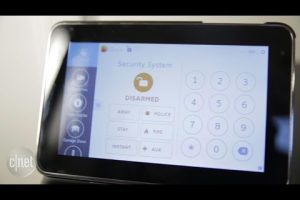
The AT&T Digital Life keypad serves as the primary command center for your home security and automation system. Unlike standalone alarm keypads, this device integrates seamlessly with AT&T’s broader Digital Life ecosystem, combining intrusion detection, environmental monitoring, and smart home controls into a single, easy-to-use interface. The keypad communicates wirelessly with the central hub, allowing you to arm or disarm your system, monitor sensor status, control connected devices, and receive real-time alerts — all from one convenient location near your entryway.
AT&T designed this keypad with both simplicity and sophistication in mind. The backlit display provides clear visibility day or night, while the responsive tactile buttons ensure accurate input even in high-stress situations. For anyone asking, “What can the AT&T Digital Life keypad actually do?” — the answer is far more than just triggering an alarm.
Core Features and Capabilities
Understanding the full feature set of the AT&T Digital Life home security keypad helps you appreciate why it remains a popular choice among homeowners. Here are the standout capabilities that set it apart from generic alarm interfaces:
- Wireless Communication: The keypad connects to the Digital Life hub via Z-Wave or proprietary wireless protocols, eliminating the need for messy wiring and enabling flexible placement throughout your home.
- Arming Modes: Supports multiple arming configurations including Stay mode, Away mode, and Night mode, giving you granular control over which sensors are active at any given time.
- Smart Home Integration: Compatible with select smart locks, lighting systems, and climate controls, allowing automated routines triggered by arming or disarming events.
- Built-In Siren: A loud audible alarm activates when the system is triggered, serving as both a deterrent and a notification tool.
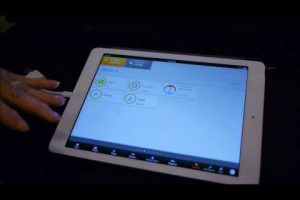
- Remote Access Compatibility: Pairs with the AT&T Digital Life mobile app, so you can manage your keypad settings and check system status from anywhere with an internet connection.
- Backlit Keypad Display: An easy-to-read LCD screen shows system status, sensor names, timestamps, and alert notifications at a glance.

How the Keypad Fits Into the Digital Life Ecosystem
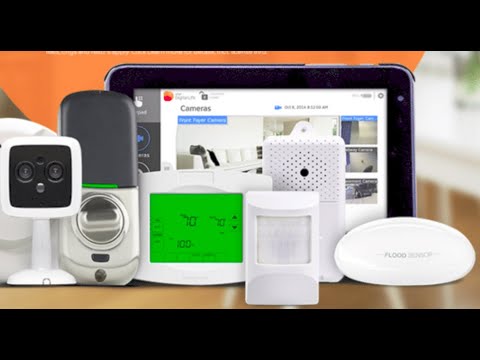
The keypad doesn’t work in isolation. It functions as a node within a comprehensive network that includes door/window sensors, motion detectors, glass-break sensors, smoke and carbon monoxide detectors, water leak sensors, and cameras. When you enter your access code, the keypad communicates with the hub, which then orchestrates the appropriate response across all connected devices. This interconnected approach is what makes the AT&T Digital Life system keypad significantly more powerful than a traditional standalone alarm panel.
Setting Up and Programming Your Keypad
For beginners, the setup process for the AT&T Digital Life keypad is refreshingly straightforward. However, intermediate and advanced users will appreciate the depth of customization available once the basic installation is complete.
Step-by-Step Installation Guide
- Position the Keypad: Place the keypad within wireless range of your Digital Life hub, ideally near your primary entry door. Ensure it’s mounted at a comfortable height — roughly 48 inches from the floor for most adults.
- Power On: Connect the keypad to a standard electrical outlet using the included AC adapter. The device will automatically detect the hub and begin pairing.
- Pair with Hub: Follow the on-screen prompts to establish communication with the central hub. This typically involves entering a unique pairing code found on the hub’s label.
- Set Your Master Code: Create a secure master access code. This code controls programming functions, so choose something memorable yet difficult to guess. Avoid obvious combinations like “1234” or your address number.
- Register User Codes: Assign individual access codes for each household member. You can set multiple user codes with varying permission levels — some users may only be able to disarm, while administrators can access full programming.
- Test All Functions: Trigger each sensor type and verify that the keypad registers the event correctly. Check that the siren, app notifications, and monitoring alerts all function as expected.
Intermediate Programming Tips
Once your keypad is operational, consider these Digital Life keypad setup enhancements:
- Customize arm/disarm delays to give your family adequate time to exit before the system activates.
- Set up automatic arming schedules so the system enters Stay mode during bedtime hours without manual intervention.
- Configure the keypad to trigger specific scenes, such as turning off all lights when you arm the system in Away mode.
Troubleshooting Common Keypad Issues
Even the best-engineered systems occasionally need attention. Here are the most frequent problems users encounter with their AT&T Digital Life keypad and proven solutions for each.
| Issue | Likely Cause | Solution |
| Keypad not responding to code entry | Dead batteries or hub communication loss | Replace batteries and verify hub connectivity through the app |
| False alarm triggers | Sensor sensitivity settings too high or environmental factors | Recalibrate sensor sensitivity through the programming menu |
| Keypad display frozen | Software glitch or power interruption | Perform a soft reset by unplugging for 30 seconds, then reconnecting |
| Delayed response when arming | Wireless interference from nearby devices | Relocate the keypad or hub away from Wi-Fi routers and microwaves |
| User code not recognized | Code was deleted or entered incorrectly | Re-enter the code using the master code and re-register the user |
| Siren not sounding on trigger | Siren muted in settings or low battery on wireless siren | Check siren settings and battery levels through the app dashboard |
For persistent issues that resist these fixes, contacting AT&T Digital Life customer support or scheduling a technician visit is always the safest route. Attempting hardware repairs on the keypad itself can void warranties and compromise system integrity.
Advanced Expert Tips for Power Users
If you’ve mastered the basics and want to squeeze every ounce of performance from your AT&T Digital Life smart home keypad, these expert-level strategies will elevate your experience:
- Create Layered Security Zones: Program different arming configurations for different times of day. For example, a two-stage arming process where the perimeter sensors activate first, followed by interior sensors 60 seconds later, provides a more sophisticated security approach.
- Leverage Event Logs: The keypad and hub maintain detailed event histories. Review these logs weekly to identify patterns — you might notice that a specific sensor triggers repeatedly due to a pet’s movement or a draft near a window sensor.
- Integrate with Voice Assistants: Where compatible, link your Digital Life system with voice control platforms for hands-free arming and status checks. This is especially useful when your hands are full of groceries or you’re managing young children.
- Backup Power Awareness: Know exactly how long your keypad and hub will operate on battery backup during a power outage. Typically, the system provides 4-8 hours of continued protection, but this varies based on connected device load.
- Regular Firmware Updates: Check the app monthly for firmware updates to both the hub and keypad. These updates often patch security vulnerabilities and introduce new features that enhance system reliability.
Comparing the AT&T Digital Life Keypad to Alternatives
To help you evaluate whether the AT&T Digital Life keypad meets your needs, consider how it compares to other popular home security keypads on the market:
| Feature | AT&T Digital Life Keypad | Standard Alarm Keypad | Smart Home Hub Keypad |
| Wireless Protocol | Z-Wave / Proprietary | RF 433 MHz | Wi-Fi / Zigbee |
| Smart Home Integration | Moderate (select devices) | Limited | Extensive (multiple ecosystems) |
| Professional Monitoring | Available through AT&T | Optional / Third-party | Varies by brand |
| Ease of Setup | Beginner-friendly | Moderate | Moderate to Advanced |
| Monthly Monitoring Cost | Typically $25-$45/month | $15-$35/month | $20-$50/month |
| Mobile App Access | Yes (AT&T Digital Life app) | Varies | Yes (brand-specific app) |
The AT&T Digital Life keypad occupies a sweet spot between simplicity and functionality. It’s more capable than a basic alarm keypad yet less overwhelming than a full smart home hub with integrated security. For homeowners who want reliable protection without a steep learning curve, it remains an excellent choice.
Who Should Invest in the AT&T Digital Life Keypad?
This system is ideal for several specific user profiles. If you fall into any of these categories, the keypad for AT&T Digital Life alarm system will likely exceed your expectations:

- Families who need multiple user codes with different permission levels for teens, elderly relatives, or caregivers.
- Homeowners already using AT&T internet or TV services who want a unified provider experience.
- People who prefer professional monitoring but want intuitive self-management through a mobile app.
- Users who want wireless convenience without the complexity of setting up multiple smart home platforms.
Conversely, if you’re deeply embedded in a specific smart home ecosystem like Google Home or Apple HomeKit and want native integration at every level, you might find the AT&T Digital Life system somewhat limiting in its interoperability.
Final Thoughts and Recommendations
The AT&T Digital Life keypad represents a thoughtful approach to home security — one that balances powerful features with everyday usability. Its wireless architecture, multi-mode arming capabilities, and ecosystem integration make it a compelling choice for homeowners who want more than just a basic alarm. By following the setup guidelines, programming tips, and troubleshooting strategies outlined in this guide, you can ensure your system delivers dependable protection for years to come. Keep your firmware updated, review your event logs regularly, and never underestimate the value of a well-configured arming schedule. Your home’s security is only as strong as the weakest link, and a thoroughly optimized keypad eliminates the most common points of failure.
Frequently Asked Questions
Q1: Can I install the AT&T Digital Life keypad myself, or do I need a professional installer?
AT&T designed the keypad for DIY installation. The wireless pairing process, mounting, and basic programming are all manageable for most homeowners. However, if you opt for professional monitoring, AT&T typically dispatches a technician to ensure the system is configured correctly and tested end-to-end.
Q2: What happens if I forget my master access code on the Digital Life keypad?
If you forget your master code, you’ll need to contact AT&T Digital Life support for a factory reset procedure. This will restore the keypad to its original out-of-box settings, and you’ll need to reconfigure all user codes and preferences. This is why it’s critical to store your master code in a safe but accessible location.
Q3: Is the AT&T Digital Life keypad compatible with smart locks from other brands?
Compatibility depends on the specific smart lock model. AT&T Digital Life supports select Z-Wave and Zigbee-enabled smart locks. Before purchasing a third-party lock, verify its compatibility with the AT&T Digital Life hub through the official device compatibility list in the app or on AT&T’s support website.
Q4: How long does the keypad battery last, and how do I know when to replace it?
The keypad typically runs on a standard AC adapter for primary power, with a backup battery that lasts approximately 4-8 hours during outages. The backup battery should be replaced every 2-3 years for optimal reliability. The app will send a notification when battery levels drop below a critical threshold.
Q5: Can I arm and disarm my AT&T Digital Life system remotely without the keypad?
Yes. Through the AT&T Digital Life mobile app, you can arm, disarm, and monitor your system from anywhere with an active internet connection on your smartphone or tablet. This is one of the system’s most valued features for users who frequently leave home and need flexible security management.
Q6: What is the warranty coverage for the AT&T Digital Life keypad?
AT&T typically offers a standard one-year limited warranty on the keypad hardware. Extended warranty options may be available through AT&T’s protection plans. The warranty covers manufacturing defects but does not include damage from misuse, water exposure, or unauthorized modifications. Always register your device on AT&T’s website immediately after purchase to activate your warranty coverage.