


Amazon devices have fundamentally transformed the way millions of households interact with technology, manage their homes, consume media, and organize their daily routines. From voice-controlled smart speakers to e-readers, streaming devices, and home security systems, the Amazon hardware lineup has grown into one of the most comprehensive ecosystems on the market today. Whether you are a tech enthusiast looking to build a fully connected smart home or a casual user searching for an affordable tablet for reading and streaming, understanding the full range of Amazon devices can help you make smarter purchasing decisions. In this guide, we explore every major category, highlight standout features, compare options, and answer the most common questions buyers have about building their own Amazon device setup.
What Exactly Is an Amazon Device?
An Amazon device refers to any hardware product designed, manufactured, or branded by Amazon to work seamlessly with its digital ecosystem. These products range from voice assistants powered by Alexa to dedicated e-readers, streaming sticks, tablets, and internet-connected home security cameras. What makes these devices unique is the deep integration they share with Amazon’s services, including Prime Video, Audible, Kindle, Music, Alexa Skills, and the broader Amazon Smart Home platform. Each device is engineered to deliver a frictionless experience, whether you are setting a timer, ordering groceries, reading a bestseller, or watching a movie in 4K resolution.
Types of Amazon Devices Available

Amazon Echo Smart Speakers
The Amazon Echo lineup sits at the heart of the company’s smart home strategy. Powered by Alexa, these speakers are far more than audio playback devices. The Echo Dot is the most popular entry-level option, offering compact design and surprisingly clear sound for its size. The Echo Show adds a touchscreen display, making it ideal for video calls, recipe viewing, and smart home dashboards. The Echo Studio delivers premium 3D audio with deep bass, catering to audiophiles who want high-fidelity music streaming. Meanwhile, the Echo Auto brings Alexa integration directly into your car’s infotainment system. These speakers support thousands of Alexa Skills, allowing you to control compatible lights, locks, thermostats, and plugs using just your voice.
Amazon Fire Tablets
Amazon Fire Tablets are among the best-selling budget-friendly tablets on the market, offering a balance of affordability and functionality. The Fire HD 8 and Fire HD 10 models are the most popular choices for media consumption, casual gaming, and reading. These tablets feature vibrant IPS displays, access to Amazon’s vast content library, and integration with Alexa for hands-free control. The Fire HD 10 Kids Edition comes with a durable case, a two-year worry-free guarantee, and a one-year subscription to Amazon Kids+. For those seeking a more productivity-oriented experience, the Fire HD 10 Plus offers 3GB of RAM and a smoother performance for multitasking.
Amazon Fire TV and Fire Stick
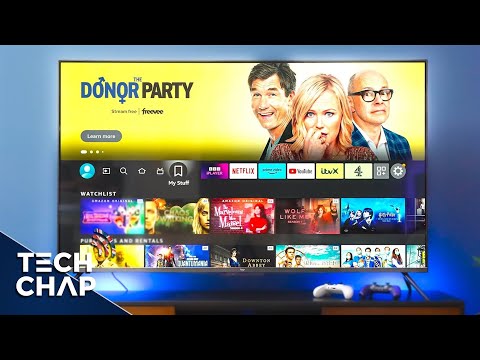
If you are looking to turn any standard television into a smart TV, Amazon Fire TV devices are the go-to solution. The Fire TV Stick 4K Max delivers 4K Ultra HD streaming, Dolby Vision, HDR10+, and Wi-Fi 6 support for fast, buffer-free viewing. The Fire TV Cube goes a step further by combining a streaming device with an Echo speaker, enabling full voice control over your TV, soundbar, and connected home devices. For casual viewers, the Fire TV Stick Lite offers an affordable entry point. These devices integrate with Netflix, Disney+, HBO Max, Prime Video, and thousands of other apps, making them incredibly versatile.
Kindle E-Readers
Amazon Kindle devices remain the gold standard for dedicated e-reading. The Kindle Paperwhite features a 6.8-inch glare-free display with adjustable warm light, making it comfortable for reading in any lighting condition. The Kindle Oasis is the premium model, offering a larger screen, physical page-turn buttons, and ergonomic design. For budget-conscious readers, the basic Kindle still delivers an excellent reading experience with weeks of battery life on a single charge. All Kindle devices sync with Amazon’s cloud library, giving you access to millions of books, magazines, and audiobooks through Audible integration.
Ring and Other Amazon Smart Home Devices
Amazon’s smart home portfolio extends well beyond speakers and tablets. Ring doorbells, security cameras, and alarm systems are designed to provide comprehensive home protection. The Ring Video Doorbell Pro offers advanced motion detection, two-way talk, and high-definition video recording. Ring Indoor Cams and Floodlight Cams complement the lineup, enabling 24/7 monitoring from anywhere using the Alexa app. Additionally, Amazon’s Echo line works as a centralized hub for third-party smart home devices, supporting protocols like Zigbee and Matter, which eliminates the need for a separate smart home bridge in many cases.
Key Features That Set Amazon Devices Apart

Several factors contribute to the widespread popularity of Amazon devices:
- Alexa Integration: Voice control across every Amazon device enables hands-free operation for tasks ranging from setting reminders to controlling smart home accessories.
- Prime Ecosystem Benefits: Amazon Prime members receive exclusive discounts, early access to deals, and seamless access to Prime Video, Prime Music, and Audible content.
- Cross-Device Syncing: Content, preferences, and settings sync across all Amazon devices, creating a unified user experience whether you are switching from a Fire Tablet to a Fire TV Stick.
- Affordability: Amazon consistently offers competitive pricing, especially during Prime Day and Black Friday sales, making its devices accessible to a wide range of budgets.
- Regular Software Updates: Amazon frequently releases firmware and software updates that add new features, improve performance, and patch security vulnerabilities.
Amazon Device Ecosystem: How They Work Together
One of the strongest selling points of Amazon’s hardware lineup is how well the devices communicate with each other. A Fire Tablet can mirror content to a Fire TV Stick using the Amazon app’s casting feature. An Echo speaker can play audio from a Kindle when you receive a new audiobook purchase. Ring security footage can trigger Alexa announcements or appear on an Echo Show screen the moment motion is detected. This level of integration creates a cohesive environment that feels effortless to use. Building a smart home with Amazon devices means choosing products that are guaranteed to work together without compatibility headaches.
How to Choose the Right Amazon Device for You
Selecting the perfect Amazon device depends on your primary use case, budget, and existing tech setup. Below is a comparison table of the most popular Amazon devices across different categories to help you decide.
| Device | Category | Starting Price | Best For |
| Echo Dot (5th Gen) | Smart Speaker | $49.99 | Voice assistant & smart home hub |
| Echo Show 10 (3rd Gen) | Smart Display | $249.99 | Video calls & smart home dashboard |
| Fire HD 10 Tablet | Tablet | $139.99 | Media consumption & casual use |
| Fire TV Stick 4K Max | Streaming | $39.99 | 4K streaming on any TV |
| Kindle Paperwhite | E-Reader | $139.99 | Book reading & audiobook listening |
| Ring Video Doorbell Pro | Security | $199.99 | Home security & package monitoring |
Consider what you use most frequently. If you listen to music or podcasts throughout the day, an Echo speaker is the logical first device. If you read voraciously, investing in a Kindle Paperwhite will provide a superior reading experience compared to a general-purpose tablet. For families with children, a Fire HD 10 Kids Edition combines durability with parental controls that manage screen time and content access.
Setting Up Your Amazon Device Like a Pro
Getting started with any Amazon device is straightforward, but a few expert tips can optimize your experience from day one:
- Connect to a 5GHz Wi-Fi band: For streaming devices like the Fire TV Stick, a 5GHz connection delivers faster speeds and reduces buffering during playback.
- Enable Drop-In and announcements: If you own multiple Echo devices, set up Drop In to create a household intercom system that works instantly.
- Create routines in the Alexa app: Automate tasks such as turning off lights, reading the news, and adjusting the thermostat at a specific time every morning.
- Use Amazon Kids+ on Fire Tablets: This subscription gives children access to age-appropriate content, educational apps, and books while giving parents full control over usage.
- Secure your device: Enable two-step verification on your Amazon account, set up voice profiles for personalized responses, and review Alexa privacy settings regularly.
Amazon Device FAQs
What is the best Amazon device for a smart home beginner?
The Amazon Echo Dot is widely regarded as the best starting point for smart home beginners. It is affordable, compact, and serves as the central hub for controlling compatible smart lights, plugs, and sensors using simple voice commands through Alexa.
Can I use Amazon Fire devices without an Amazon Prime subscription?
Yes, you can use Amazon Fire tablets, Fire TV devices, and Kindles without an Amazon Prime membership. However, Prime members unlock additional benefits such as exclusive discounts, ad-free music streaming on Amazon Music, access to Prime Video content, and free e-book borrowing through Prime Reading.
Are Amazon Fire tablets good for everyday use?
Amazon Fire tablets are excellent for media consumption, casual gaming, reading, and video calls. While they run a modified version of Android and are not ideal for heavy productivity tasks, they offer impressive value for their price point and are particularly well-suited for entertainment purposes.
How do Amazon Echo devices compare to Google Home speakers?
Amazon Echo devices generally offer a broader range of Alexa Skills and deeper integration with smart home accessories compared to Google Home. Google Home, on the other hand, excels in search-based queries and YouTube integration. The choice often comes down to which voice assistant ecosystem you prefer and which smart home devices you already own.
What should I know about privacy and Amazon devices?
Amazon records voice interactions with Alexa to improve its service, but users can review, delete, and opt out of voice data collection through the Alexa app settings. Disabling the microphone on Echo devices with a physical button ensures no audio is captured, and all Echo devices include a visual indicator light when the microphone is active.
Final Thoughts
The Amazon device ecosystem has matured into a powerful, versatile, and affordable collection of hardware that serves virtually every digital lifestyle need. Whether your priority is staying connected through voice commands, immersing yourself in books with a Kindle, streaming your favorite shows in stunning 4K, or securing your home with Ring cameras, Amazon has a device designed to meet that need. The true strength of the ecosystem lies in how these devices complement each other, creating a seamless experience that grows with your household’s demands. By choosing the right combination of products and leveraging the tips and strategies outlined in this guide, you can build a connected environment that is both practical and enjoyable for years to come.